Many of your expensive servers likely sit idle. In 2025, companies wasted an average of 35% of their cloud budgets, burning through roughly $182 billion globally.
You are losing money because of poor visibility. When you cannot track your digital resources, you cannot control your costs. The right Kubernetes tagging strategy fixes this immediately. By attaching simple, standardised labels to your cloud assets.
In this blog, I will tell you exactly how you can build a tagging system that actually scales and reduces waste.
60-Second Summary:
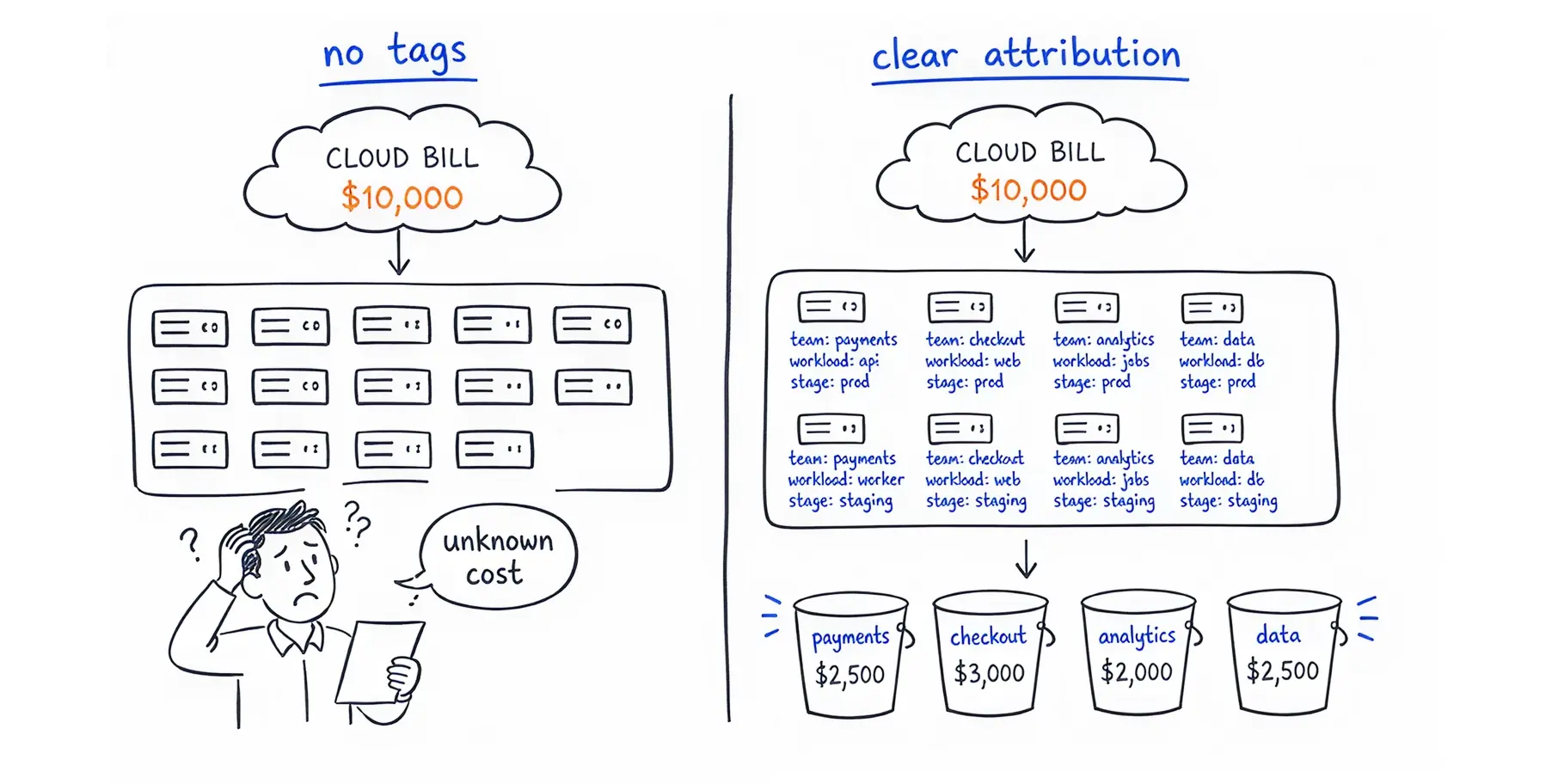
If you’re a CFO, I’m sure you have experienced this after receiving a huge bill when you ask your team to explain the reason for the spike, nobody responds because nobody knows.
This happens because resources are launched without a clear owner. A tagging strategy is a strict set of rules that forces every digital asset to carry a label showing who owns it, what application it supports, and which environment it belongs to.
Bad data hygiene often drains your budget. When engineers spin up test servers and forget to turn them off, these "orphaned resources" continue to run and charge your account 24/7.
Recent industry benchmarks show that the average CPU utilisation across Kubernetes clusters is a staggering 10%, while memory utilisation sits at just 23%.
Without tags, you can’t safely identify and shut down these idle assets because you do not know if they belong to a critical production system or a forgotten side project. Follow this Kubernetes Cost Optimization guide to reduce idle cloud waste and improve infrastructure efficiency
When you tag resources correctly, you stop guessing. You gain the ability to implement "showback" (showing teams exactly what they spend) and "chargeback" (billing departments for their exact usage).
This shifts the financial responsibility back to the people spending the money. When a department sees a $50,000 monthly charge directly tied to their specific team tag, they suddenly care about optimising their servers.
Also Read: Kubernetes Chargeback vs. Showback
Engineers focus on speed and uptime. Finance focuses on margins. Proper tagging translates engineering actions into financial data.
Costimizer Solution: If your teams struggle to connect infrastructure to business value, Costimizer can help. Our Agentic AI platform tracks tags and automatically performs Kubernetes pod rightsizing across your workloads. Instead of just showing you a chart, Costimizer actively adjusts CPU and memory limits, ensuring your engineering metrics align perfectly with your financial goals without impacting application performance.
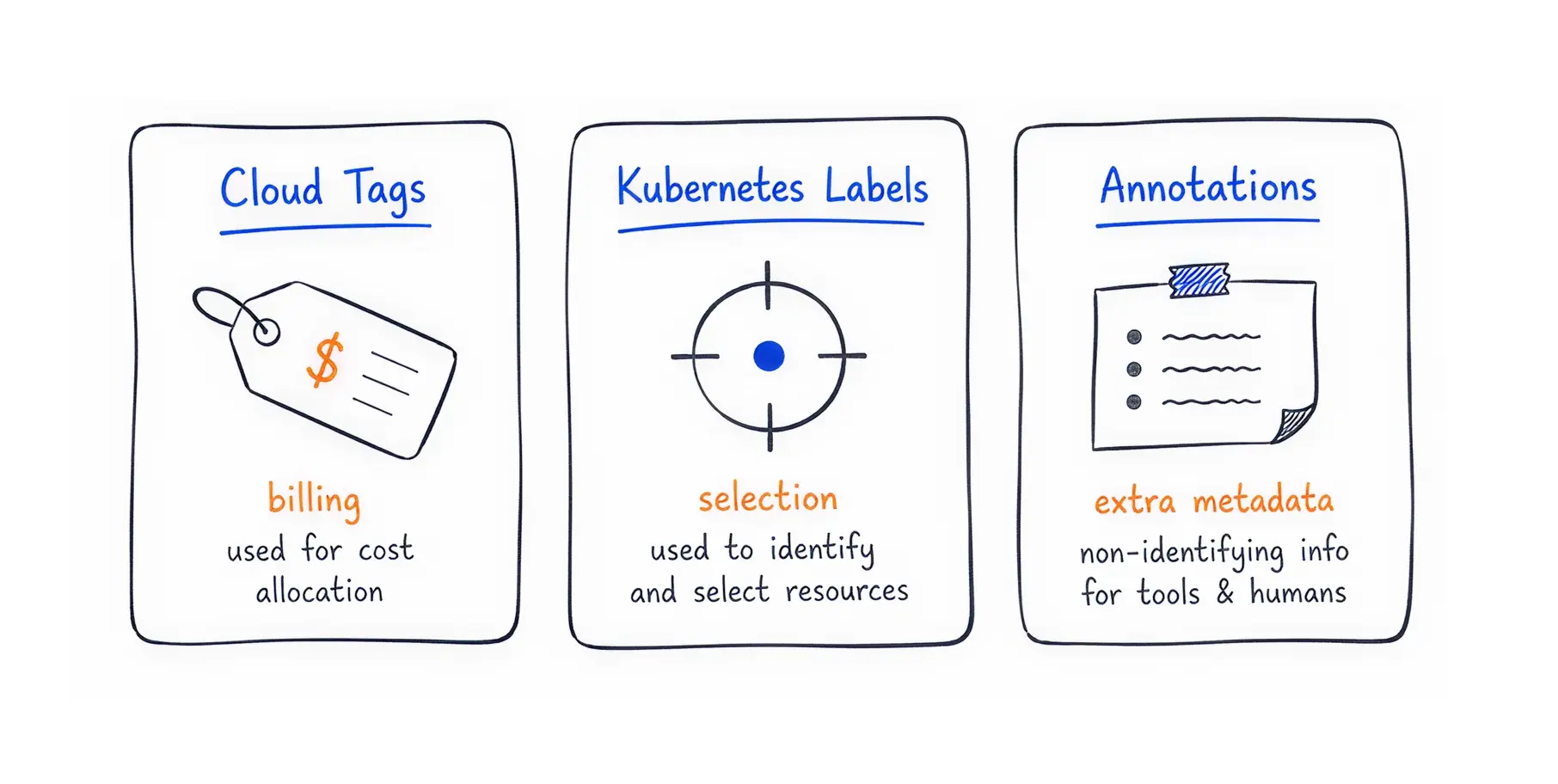
You hear the terms "tags," "labels," and "annotations" used interchangeably. They are not the same. Using the wrong one will break your automation and confuse your reporting tools.
Amazon Web Services (AWS) and Microsoft Azure use the term "Tags" to apply metadata to cloud infrastructure like virtual machines and databases. Google Cloud Platform (GCP) and Kubernetes use the term "Labels" for the same function.
While the names differ, their goal is identical: to attach key-value pairs (like env: production) to resources for billing and grouping.
Inside Kubernetes, the distinction between Labels and Annotations is critical.
Feature | Cloud Tags (AWS/Azure) | Kubernetes Labels | Kubernetes Annotations |
Primary User | Billing systems, Cloud APIs | Kubernetes core systems | Humans, 3rd-party tools |
Function | Cost allocation, security | Grouping and selecting pods | Storing extra information |
Character Limit | Generally 256 characters | 63 characters max | Up to 256 KB of data |
Searchable? | Yes | Yes | No (cannot use for selecting) |
CXOs often fail at tagging because they try to track too many details at once. They create a list of twenty mandatory tags, frustrating their engineers. The system collapses before it even begins.
My team and I recommend a phased approach. Start small. Get compliance. Then, slowly add complexity as your business matures.
To gain immediate control over your billing, enforce these three basic tags across every single resource today:
These three tags alone will instantly answer the most important question: Who is spending what, and on which product?
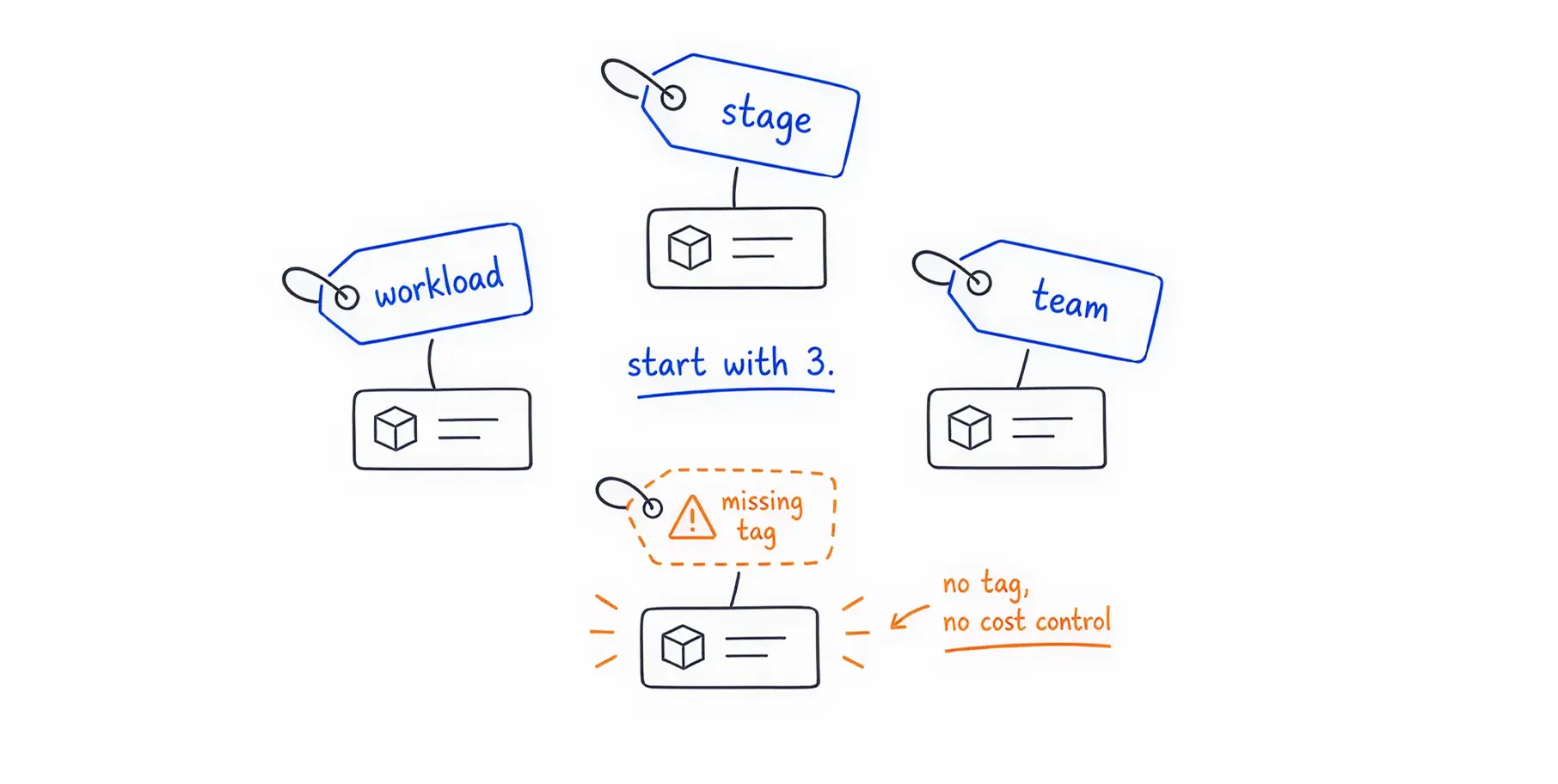
Once your team consistently applies the basic tags, you can scale up.
Add cost-centre: 8045 to route bills directly to accounting ledgers.
Add business-criticality: high to ensure automated cleanup scripts never accidentally delete an essential database.
Costimizer Solution: If you have thousands of untagged resources from the past, manually fixing them is nearly impossible. Costimizer’s Virtual Tag Governance automatically identifies orphaned resources and applies virtual tags based on spending behaviour. We clean up the mess for you, instantly organising your current bill.
Kubernetes provides an official, standardised way to name your labels. Using their recommended naming convention prevents conflicts when you install software from different vendors.
Kubernetes suggests using a specific prefix for all standard labels: app.kubernetes.io/. This separates your internal business tags from the tags that run the actual software.
Here is a quick cheat sheet of the standard labels:
You must apply these labels consistently across all core objects. When you deploy a new application, the Pods (the actual running containers), the Deployments (the rules for running the Pods), and the Services (the networking rules) should all share the same app.kubernetes.io/name and instance labels. This connects the entire stack.
As your system grows, you will use advanced tools like ReplicaSets, StatefulSets, and DaemonSets.
The rule remains the same.
Pass the standard labels down to every level. If a StatefulSet does not have the proper tags, the storage volumes it creates will also lack tags, creating untrackable costs.
Your servers run Docker images. How you name and version these images directly affects the stability of your business. Poor image tagging leads to broken websites and lost customers.
When developers build a new container image, Docker automatically applies the tag latest. Using this tag in a live production environment is highly dangerous.
The latest tag is a moving target. It simply points to whatever was uploaded last. If two developers upload different versions of an application at the same time, the latest tag overwrites the previous version. When your Kubernetes cluster restarts, it will pull the new, untested code automatically, breaking your production system.
Our engineers have a clear solution for this. Never use latest for production.
Instead, combine your application version number with a unique Git commit hash. A Git commit hash is a long string of letters and numbers generated every time a developer saves code. By tagging your image with something like v1.2.0-a1b2c3d, you create an immutable, exact record. If something breaks, you know exactly which version of the code caused the issue, and you can roll back instantly.
Labels are not just for humans reading bills. Kubernetes uses them to physically route traffic and place servers. It does this using "Label Selectors."
Kubernetes uses two methods to filter and find labels:
You can use labels to control exactly where your workloads live. This is called "Node Affinity."
Imagine you have expensive servers with powerful graphics cards (GPUs) and cheaper, standard servers. You do not want a basic web application running on an expensive GPU server. By labeling the GPU servers with hardware: gpu, you can instruct Kubernetes to only place specific, high-priority workloads on those machines. This prevents cheaper tasks from consuming premium resources.
Even with a plan, companies make simple mistakes that break their monitoring systems. You must be aware of how different tools react to your tags.
Kubernetes has strict syntax rules. Label keys and values must be 63 characters or less. They must begin and end with an alphanumeric character.
The most common mistake is using spaces or special characters. Always use hyphens (-) or underscores (_). Furthermore, labels are case-sensitive.
If one developer types Environment: Prod and another types environment: prod, the computer sees them as two entirely different tags. Your reports will be completely inaccurate.
When you buy expensive monitoring software, you must follow its specific rules.
For example, Datadog reserves several tag names for its own internal use. If you use the tags host, device, source, service, or env, Datadog will automatically override your values or behave unpredictably. Many engineering teams learn the hard way that using the tag source will break their Datadog logging pipelines completely.
If you use Dynatrace, simply applying a label in Kubernetes is not enough. Dynatrace requires you to build specific tagging rules to convert Kubernetes labels into readable service tags. You must use specific API configurations to ensure the metadata flows correctly from the Kubernetes Pod up to the Dynatrace Data Explorer.
Always check your vendor documentation before launching a company-wide standard.
You cannot rely on us humans to remember to tag resources. People forget. They rush. The only way to guarantee a flawless tagging strategy is to automate it completely.
"Shifting left" means fixing problems early in the software creation process. Do not let developers click around a cloud dashboard to create servers.
Force them to use Infrastructure as Code tools like Terraform or Helm. These tools allow you to write your infrastructure requirements as code files. You can program these files to automatically apply default tags to every single resource generated.
Honestly, we have an extremely firm stance: no tags, no deployment.
We will configure your Continuous Integration/Continuous Deployment (CI/CD) pipelines to scan the code before it ever reaches the cloud. If a developer attempts to launch a server without the mandatory workload, stage, and team tags, our tool can automatically reject the code. The build fails, and the developer receives an error message instructing them to add the missing tags.
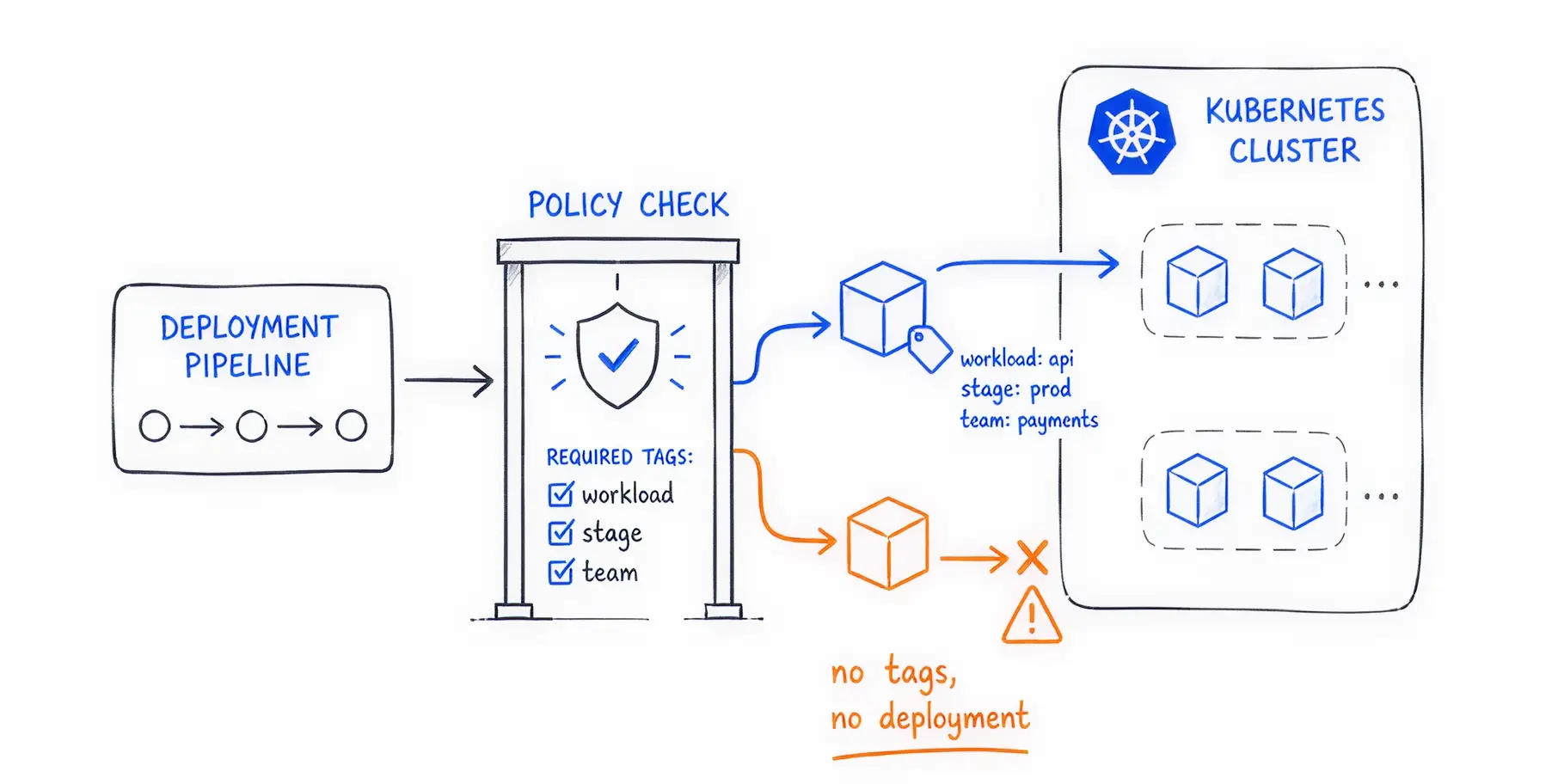
To create a foolproof system, you must use Kubernetes Admission Controllers.
Tools like Open Policy Agent (OPA), Kyverno, or Plural.sh act as digital security guards at the door of your Kubernetes cluster. When a request arrives to create a new pod, the Admission Controller inspects it. If the required labels are missing, the controller denies the request entirely.
This guarantees that 100% of the resources running in your system are correctly tagged and accounted for.
What about the old resources already running without tags? You need an automated cleanup crew.
Costimizer Solution: You do not have to write custom scripts to fix your past mistakes. Costimizer’s Cloud Anomaly Detection and Policy Builder constantly scans your environment. When it finds an untagged, orphaned resource, it instantly flags the anomaly.
You can set rules to automatically assign virtual tags to these mystery servers, or even auto-park them to stop the billing bleed immediately.
You now understand that a tagging strategy is much more than digital bookkeeping. It is the foundation of your company's financial health in the cloud.
The equation is absolute: Good tagging equals good visibility and accurate Kubernetes Cost Allocation. Good cost visibility equals higher profit margins and an extended runway for your business.
Let’s Take This One Step Ahead: We all should stop waiting for the invoice to arrive at the end of the month. Use Costimizer to gain instant, real-time visibility into your AWS, Azure, and GCP spend.
Our Agentic AI platform will automatically identify untagged resources, right-size your Kubernetes clusters, and enforce budgets effortlessly.
You can apply tags to old resources, but cloud providers will not backdate your billing reports. The new tags will only organise your costs from the exact moment you apply them forward.
Costimizer provides Virtual Tag Governance. It automatically identifies untagged resources and intelligently groups them based on historical data. This organises your bill instantly without forcing developers to rewrite old code.
This usually happens because of hidden resources like network bandwidth, data transfer fees, or automatic snapshots. You must ensure your automation scripts apply tags to these secondary storage and networking components.
Costimizer is an Agentic AI platform. It does not just send dashboard alerts. You can authorise it to automatically right-size servers, delete unattached storage volumes, and park idle resources during off-hours.
No. Kubernetes syntax strictly prohibits spaces in label keys and values. You must use hyphens or underscores to separate words to prevent system errors.
Setup takes 60 seconds. Our platform scans your environment and provides actionable recommendations in under 48 hours. Most teams uncover up to 30% in immediate savings during their first week.
If done manually, yes. If you automate tagging using Infrastructure as Code (like Terraform) or automated pipeline blockers, it adds zero delay to your deployment speed.
Yes. Costimizer offers Unified Multi-Cloud Monitoring. It connects AWS, Azure, and GCP into one single dashboard. You do not have to learn three different billing tools.
•
CTO•
Articles