You are likely paying for compute capacity that hasn’t processed a single request in weeks.
It happens in nearly every enterprise. A developer spins up an EC2 instance for proof of concept, gets pulled right into his day-to-day tasks, and forgets he even used it.
And this is not just one example of zombie resource
There are more:
An implementation script fails, leaving unattached EBS quantities behind.
A traditional application is moved; however, the tonal balancer remains active.
The majority of tech leaders know this waste exists. The problem isn't understanding; it is the concern of removal. The worry that switching off a zombie server will break a critical dependency that nobody documented.
This blog describes a risk-free, systematic process for identifying and removing zombie resources without causing any trouble. Also, we'll cover exactly how you can use Costimizer to automate this job and achieve the best results for your money.
Leaving unused cloud resources running is rarely a conscious choice. It is usually a byproduct of speed. Engineering teams prioritize shipping features over housekeeping. Over time, this accumulation of waste creates a tax on your cloud spend.
Cloud waste is not just a line item; it is a signal of operational inefficiency. If you don't know what you are paying for, you don't know what you are building.
— J.R. Storment, Executive Director of the FinOps Foundation
The numbers back this up. According to the Flexera 2025 State of the Cloud Report, , companies estimate they waste 32% of their cloud investment. A considerable section of that waste comes from resources that are provisioned yet completely idle.

Cost is the obvious metric, but security is something that companies often overlook. Let’s say there is an unpatched, forgotten VM. Nobody is monitoring it. Nobody is updating their OS. If an attacker compromises a zombie resource, they usually have a footing in your VPC for months before anyone notices.
You need to know what you are looking for before you can clean it up. Different clouds hide waste in other places.
These are virtual machines (EC2, Azure VMs, GCE Instances) with low or zero CPU utilization.
The Trap: A VM running at 2% CPU utilization might not be unused. It could be a heartbeat monitor or a low-traffic internal tool.
The Fix: You need to look at multi-metric thresholds. A zombie typically has low CPU, low network I/O, and low memory usage over a 30-day period.
Storage is often the hardest to track because it persists even after compute is terminated.
Unattached Volumes: When an instance is terminated, the attached storage volume often remains unless Delete on Termination was checked.
Old Snapshots: Automated backup policies are great until they run for three years unchecked. You end up paying for thousands of snapshots for a database that was deleted in 2022.
Elastic IPs (EIPs): AWS charges for EIPs specifically when they are not attached to a running instance.
Load Balancers: An ELB with no registered targets or zero request count is burning hourly credits.
Here is a breakdown of common waste categories and how to detect them.
Resource Type | Detection Signal | False Positive Risk | Cleanup Action |
Idle VMs | CPU < 5% & Network I/O < 5MB for 30 days | High (Bastion hosts, config servers) | Stop, wait 2 weeks, then terminate. |
Unattached Volumes | State = Available (AWS) or Unattached (Azure) | Low | Snapshot, then delete immediately |
Orphaned Snapshots | Associated Volume ID does not exist | Low | Delete based on retention policy (e.g., >90 days). |
Idle Load Balancers | Request Count = 0 for 7 days | Medium (DR environments) | Verify backend targets, then delete. |
Unassociated IPs | Association ID = Null | Low | Release IP back to the pool. |
You cannot simply run a script to delete. That is how you get fired. You need a process that accounts for human error and technical dependencies.
This workflow prioritizes safety over speed.
If you don't have a robust cloud asset inventory, you are flying blind. The first step is to tag everything.
This is the most practical technique for handling unused cloud resources. Instead of deleting a resource, you stop it.
The most effective way to validate a dependency is to break it in a controlled environment. If nobody complains, the dependency didn't exist.
— Donny Greenberg, Tech Infrastructure Consultant
Never delete without a backup. Storage is cheap; computing is expensive.
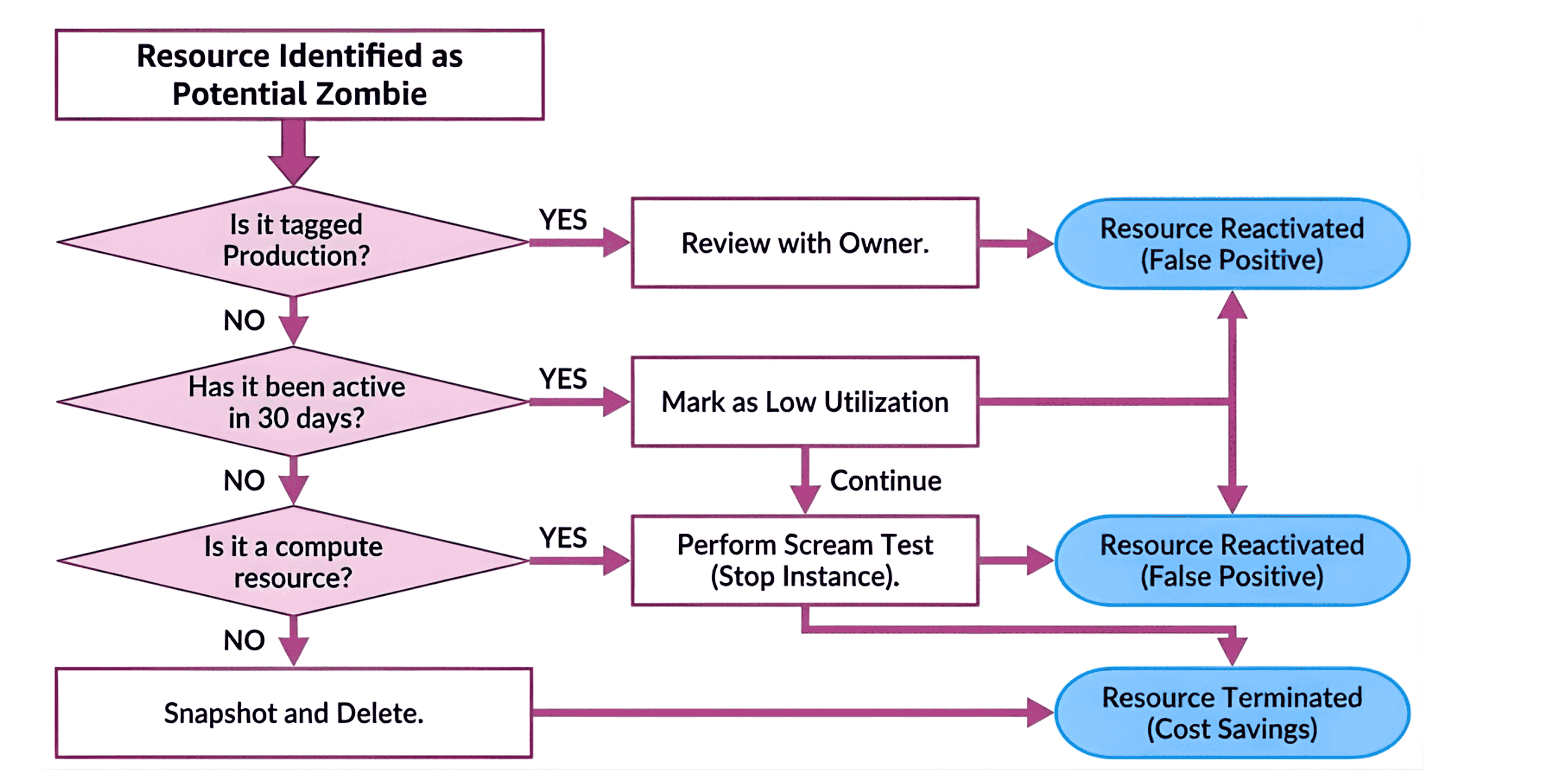
A clear decision tree helps junior engineers or automated scripts make the right call without needing constant approval from senior architects.
You can write Python scripts using Boto3 or Azure SDKs to find these resources. Many teams start here. They write a script to list unattached volumes. Then they write another for old snapshots.
The maintenance burden grows quickly. APIs change. Multi-cloud environments complicate authentication.
If you manage a small environment, scripts are fine. If you manage an enterprise spanning AWS and Azure, you need a centralized platform like Costimizer, in fact this platform can automate resource optimization, which means you wouldn’t need to follow anything from this guide, Costimizer will do it for you!
AWS Trusted Advisor and Azure Advisor provide basic checks. They are good starting points but often lack the granularity to automate actions. They will tell you a resource is idle, but they won't handle the Scream Test workflow for you.
Tools like Cloud Custodian allow you to define policies as code. This is powerful but requires significant engineering effort to maintain and secure.
Dedicated platforms ingest billing and usage data to provide context. The best cloud cost optimization tool isn't just a reporter; it’s an active participant in your infrastructure management. It handles the multi-cloud monitoring, normalizes the data, and provides the safety mechanisms for deletion. Costimizer gives you automation access within guardrails.
Feature | Cloud Native (AWS/Azure Advisor) | Scripts (Python/Bash) | Specialized SaaS (Costimizer) |
Cost | Free / Low | High (Engineering Time) | Licensing Fee |
Multi-Cloud | No | Difficult to maintain | Native |
Automation | Limited | High | High (Policy-based) |
Historical Data | Limited | Requires Database | Included |
Safety Nets | Manual | Manual | Automated (Scream Tests) |
When you look for cloud cost optimization solutions, prioritize those that offer automated remediation policies rather than just reporting. Reporting doesn't save money; action does.
Once you handle the low-hanging fruit (unattached volumes, stopped instances), you have to tackle the harder problems.
Entire Dev or QA environments often become zombies. A project finishes, but the VPC, NAT Gateways, and databases remain.
Zombies hide effectively in the cracks between clouds. A common scenario involves an application running in AWS that writes logs to Azure Blob Storage. If the AWS application is decommissioned, the Azure storage keeps growing.
A cloud analytics platform that visualizes data ingress/egress can spot this. If you see storage accounts with zero read operations but constant write operations from an unknown source, investigate immediately.
For specific details on navigating the differences between providers, review a technical Azure vs AWS comparison. The billing models differ, and what looks like a zombie in AWS might be a reserved capacity charge in Azure.
Cleaning up is a temporary fix. If you don't change how you provision, the zombies will return within six months. This is where the concept of a [Zombie Infrastructure Cleanup Guide] transitions into a governance framework.
Your CI/CD pipeline should reject any deployment that lacks standard tags: CostCenter, Owner, Environment. No tag, no deploy.
Make costs visible. When an engineering manager sees that their Archived-Project-X is costing the company $3,000 a month in AWS cost reduction opportunities, they will self-correct.
Schedule a quarterly Cleanup Day. Gamify it. The team that removes the most cloud waste gets a budget for team lunch or training. This builds a culture where engineers take pride in efficiency.
Engineering culture is defined by what you tolerate. If you tolerate waste, you will build wasteful systems.
— Martin Casado, General Partner at Andreessen Horowitz
Let's look at concrete cloud computing examples of where things go wrong.
A fintech-serving company, VERMEG, migrated workloads to cloud and matched server specs one-to-one, without evaluating actual usage. That meant many resources were much larger than needed.
Reality: After migration the teams saw that resource utilization was lower than expected. Instances ran mostly idle or under-utilized.
Result: The company ended up paying for capacity they didn’t need.
Fix: They used many cloud cost optimization tools to analyze usage data across their AWS accounts and managed instance commitments automatically. The tool flagged idle/on-demand instances and helped transition to appropriately sized resources.
Savings / Outcome: Over ten months, on-demand AWS costs dropped by over 39%
Common cloud cost-saving mistakes often involve cutting production resources too aggressively while ignoring these massive piles of digital junk.
You cannot optimize what you cannot see. The first step in your Zombie Infrastructure Cleanup Guide is visibility.
The cloud is consumption-based. When you stop consuming, you stop paying. But only if you actually turn the switch off.
If you want a safer way to run this cleanup work, point Costimizer at one region and let it map idle compute, unattached storage, forgotten load balancers, and old snapshots. The scan gives you a clear list of resources, their usage history, and the risk profile. You approve what happens next. Nothing is removed without a snapshot or a stop action. It’s the fastest way to clean out zombie resources without putting your team under pressure.
Check CPU, network, and memory together. A VM with all three near zero over a long window is usually safe to investigate.
No, but cleanup is slower without them. A tagging audit early in the process reduces risk later.
Yes, as long as the parent volume no longer exists and you retain at least one recent backup.
Yes. Treat them as independent assets and verify their network links before release.
Pick one region and one resource class. Trying to clean everything at once usually slows everyone down.
It checks low CPU, low network, low memory, no tags, and no recent activity across a stable window.
Identifying unused or zombie cloud resources on native tools is tough, but Costimizer detects them and can automatically shut them down safely using built-in FinOps guardrails.
•
DevOps Engineer•
Articles