In IT, the cloud waste was a physical object. Earlier, what used to happen was that you could walk into a cool, loud server room, point at a blinking rack that wasn't doing any calculations, and say with certainty, That is a waste of money. You could physically unplug it.
Then the cloud changed the physics of infrastructure. It turned capital expenditure (CAPex) into operating expenditure (OPex). It gave every engineer in your company a corporate credit card and infinite purchasing power, usually without them even realizing it.
Today, the cloud is no longer just a place to store data. It is the engine of modern business.
“The cloud is a Ferrari, but most companies are driving it like a rental car”The problem isn't that companies are using the cloud. The problem is that they are using it blindly. Gartner estimates that organizations will overspend by up to 70% on cloud services in the coming years due to a lack of strategy. See how much cloud waste you have- Try Costimizer for Free to find hidden cloud waste.
Costimizer is going to move beyond basic tips like turn off idle instances and dive into the architectural, cultural, and technical shifts required to stop burning your budget. We’ll also talk about how you can reduce 30% cloud waste with our agentic resource optimization feature.
Before we fix the servers, we have to fix the mindset. Why do smart engineers build wasteful infrastructure? It is rarely malice. It is usually the Jevons Paradox.
In economics, the Jevons Paradox occurs when technological progress increases the efficiency with which a resource is used, but the rate of consumption of that resource rises rather than falls.
When spinning up a server took six weeks and a triplicate purchase order, engineers were careful. They optimized every byte of RAM. Now that spinning up a server takes six seconds and a single API call, the perceived cost of the action is zero. The friction is gone.
The Narrative Shift- You cannot solve this problem by yelling at engineers to save money. You solve it by changing the definition of high performance. In the modern era, high-performance code isn't just code that runs fast. It is code that runs efficiently. You must reframe waste as technical debt. Turn cloud waste into measurable technical debt with Costimizer- Schedule a demo.
The first major source of waste happens before you even finish moving to the cloud.
Many companies feel immense pressure to migrate fast. Maybe a data center lease is expiring, or there is a mandate from the Board. So they choose the path of least resistance known as Lift and Shift or Re-hosting. They take their on-premise virtual machines and move them, bit-for-bit, onto cloud instances.
The Math of the Mistake On-premise servers are usually over-provisioned. You bought a 64GB server because you might need it three years from now. Cloud servers should be lean because you can scale them instantly. When you move an over-provisioned on-prem server to the cloud without resizing it, you are simply renting a more expensive data center.
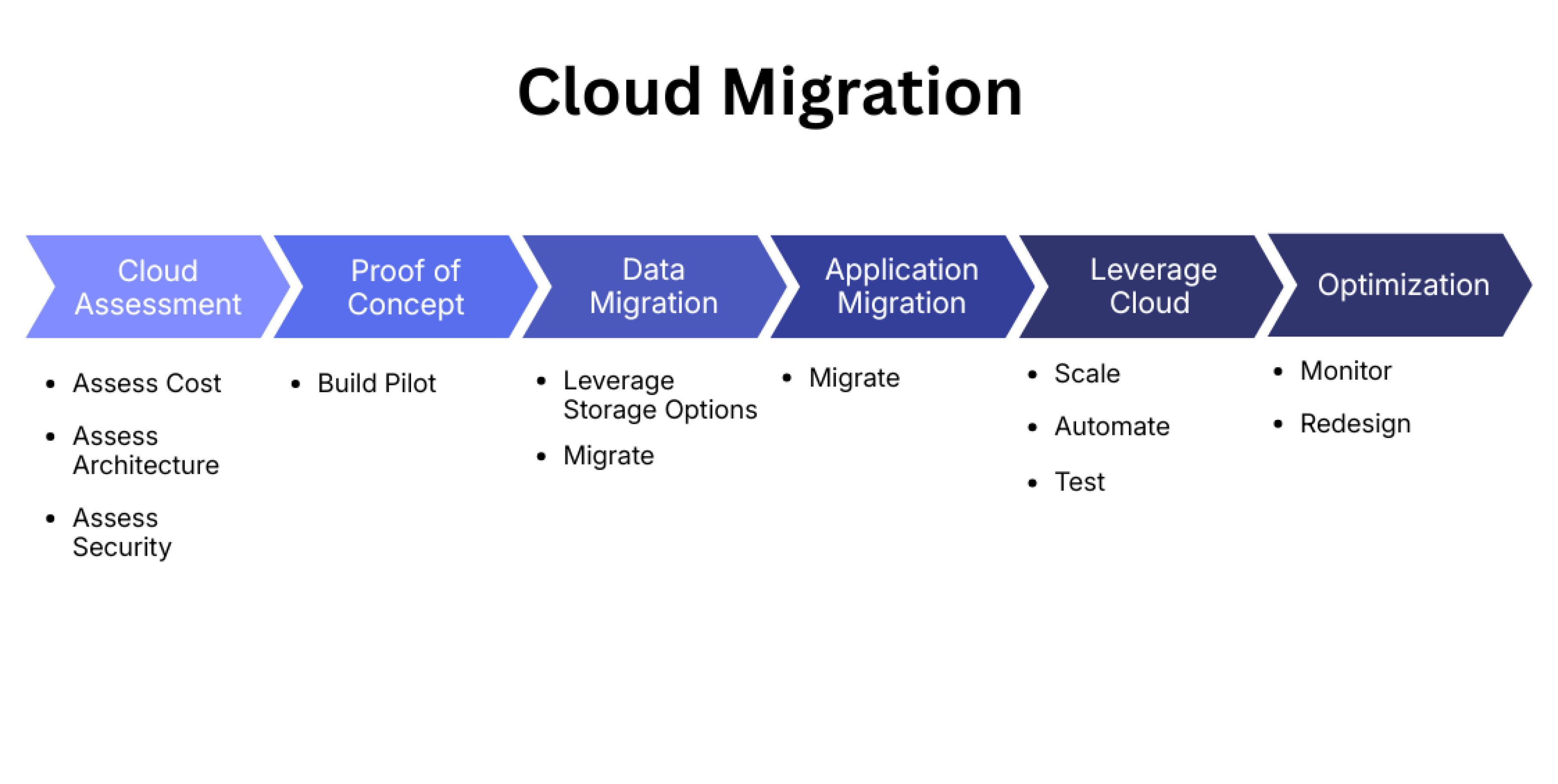
The Deep Insight: The 6 Rs Don't view migration as a binary switch. Use the 6 Rs framework to guide your cloud service lifecycle decisions:
The Rule: If you must Lift and Shift, you must have a Phase 2 immediately scheduled to execute cloud resource optimization. If you don't, you aren't modernizing. You are just bleeding cash.
You can’t fix what you can’t see. Cloud cost optimization starts with visibility.
Imagine getting a restaurant bill that just said Food: $500 without listing the items. You wouldn't know if you overpaid for the wine or the steak. Yet most Engineering Directors look at a cloud bill that says AWS EC2: $50,000 and accept it.
The Insight- The total bill is a vanity metric. It tells you nothing about efficiency. If your bill went up 20%, is that bad? Not if your user base went up 50%.
You need to move to Unit Economics. You need to answer business-level questions:
The Fix- You need to slice your bill into pools using precise cost allocation. When you can see that Team A’s testing environment costs more than Team B’s production environment, you have actionable data. This allows you to identify bloated cost centers without blindly cutting resources that drive revenue.
Most articles focus on Compute (Servers) because it is the biggest line item. But for mature cloud environments, the waste is usually hiding in the attic of storage and network.
The Orphaned Volume Issue When you terminate an EC2 instance, the attached storage volume (EBS) does not always delete automatically. It sits there, unattached, containing data nobody needs, costing you money every hour. We have seen companies paying thousands of dollars a month for hard drives attached to servers that were deleted three years ago.
The Snapshot Hoarding Are you keeping daily backups of your dev environment? Why? Are you keeping them for 5 years? Storage is cheap, but aged storage at scale is a silent killer.
The Fix
If you run Kubernetes (K8s), you are likely facing the hardest billing challenge in modern tech.
The Problem Kubernetes creates a Shared Resources problem. You have one massive cluster of servers, and ten different teams deploy their apps onto it. The cloud provider only sees the Cluster Cost. They cannot tell you which team is using which resources inside that cluster. It is like a smoothie. Once you blend the fruit, you can't separate the strawberries from the bananas.
The Insight- You cannot rely on standard cloud billing here. You need Pod-Level Metrics. You must measure how much CPU and RAM each specific container requested versus what it actually used.
The Action- Because manual tagging in containers is difficult and prone to error, you should look into virtual tags. These allow you to assign costs logically to teams or features without having to constantly update the metadata on every single microservice.
Here is a metric very few companies track, but it is critical for FinOps: Time-to-Detect (TTD).
Trying to track dynamic cloud usage with a static spreadsheet is dangerous. By the time a human updates the sheet and Finance notices a spike, the money is already gone.
The Scenario A junior developer pushes a code change on Friday at 5 PM. It creates a loop that spins up high-performance GPUs. The script runs all weekend.
If you check costs monthly, your TTD is 30 days. Cost: $50,000.
If you check costs weekly, your TTD is 7 days. Cost: $12,000.
If you have automated systems, your TTD is 4 hours. Cost: $300.
The Fix- Ditch the spreadsheets. You need a system that acts like a smoke detector.
It is rare to find an enterprise today that is 100% loyal to a single cloud. You might use AWS for your core application, Azure for your corporate AD and email, and Google Cloud for your AI research.
Managing costs across one cloud is hard. Managing them across three is exponential chaos. Each provider has different billing cycles, different names for the same service, and different discount mechanisms.
The Fix- You need a unified control plane. You cannot log into three different consoles to check your spend.
Centralizing this data allows you to spot arbitrage opportunities. Maybe running that specific workload is 20% cheaper on Azure this month? You won't know unless you can see it all in one place.
Cloud cost optimization tools are great, but culture is better. The ultimate goal is to move from Finance nagging Engineering to Engineers owning their costs.
But how do you do that? You have to choose your psychological approach carefully.
Method A: Showback You send the team a statement showing what their infrastructure would cost if they were paying the bill. It is informational. Hey Team A, you spent $4,000 this month.
Method B: Chargeback (The Invoice) You actually deduct the cost from that team’s departmental budget.
The Recommendation Start with Showback for 3 to 6 months. Let teams see the data. Gamify it by creating a leaderboard of the most efficient teams. Once the culture matures, move to Chargeback to enforce discipline.
None of the advanced strategies above work if your foundation is cracked. The two pillars of cloud hygiene are Tagging and Budgeting.
Tagging If a resource isn't tagged, it is invisible. You need a strict cloud tag management strategy. Every resource must have at least three tags:
Budgeting Do not rely on the default billing alerts. You need dedicated cloud budgeting software capabilities that allow you to set forecast-based alerts. You want to be alerted when you are predicted to go over budget, not after you have already spent the money.
Cloud waste management is not about austerity. It is not about stifling innovation or refusing to let developers spin up servers.
It is about intentionality.
Every dollar you spend on the cloud should have a direct line of sight to business value. If you are paying for a server, it should be serving a customer. If you are paying for storage, it should be data that matters.
By implementing these strategies, moving from Lift and Shift to modernization, focusing on Unit Economics, cleaning up storage hygiene, and empowering engineers with data, you stop the bleeding. You turn the cloud back into what it was promised to be: the most powerful engine for growth in the history of business. See your cloud waste for free, identify up to 30% unnecessary spend using agentic optimization.
Not always, but it is a debt trap. Sometimes you have a hard deadline to vacate a data center, and moving everything as-is is the only option. The danger isn't the move itself. The danger is treating the move as the finish line. If you lift and shift, you must have a Phase 2 immediately scheduled to refactor and right-size, or you will overpay by 30-50% indefinitely.
If you are auditing manually, once a month is the bare minimum. However, in a modern DevOps environment where code ships daily, a monthly audit is too slow. Ideally, you want continuous monitoring that blocks bad spending before it happens, rather than cleaning it up 30 days later.
Data transfer and storage snapshots. Everyone watches the big expensive servers (EC2), but they often forget about the data egress fees (moving data between regions) or the thousands of old backups (EBS snapshots) effectively sitting in a digital attic costing money every month.
Think of Reserved Instances (RIs) as a coupon for a specific item. You commit to a specific instance type in a specific region. Savings Plans are more like a gift card. You commit to spending a certain dollar amount per hour, but you have more flexibility on how you spend it (e.g., you can switch instance families). Savings Plans are generally preferred for their flexibility.
Shadow IT refers to teams buying SaaS tools or cloud resources on personal credit cards or outside central governance. The best way to combat this is not to ban it, but to bring it into the light. Offer a streamlined Fast Track procurement process so it is easier for them to go through you than around you.
Because cloud providers bill for the infrastructure (the nodes), not the applications (the pods). To understand K8s costs, you need to implement a chargeback model based on resource requests. You likely need a specialized tool or virtual tags to map these infrastructure costs back to specific business units.
Costimizer offers data-driven cost-saving recommendations by analyzing usage patterns, spotting waste, and suggesting the most efficient compute and storage options across your cloud accounts. Best part? It's completely free to start
•
DevOps Engineer•
Articles