The fastest-growing companies aren’t winning because they use the cloud, they’re winning because they choose the right kind of cloud for the right part of their business. That’s the real competitive advantage, modern businesses have.
In this blog, we'll break down 10+ different cloud computing examples with their respective types from companies you know: Netflix streaming billions of hours of content, Zoom managing millions of daily video calls, Disney managing its massive content library, and Formula 1 processing race data in real-time. In all these examples, it is not only what these types of clouds are, why they matter, how they optimize cloud cost, and, lastly, finally how this transform business operations. We’ll also cover how you can cut costs on any of these cloud computing services using Costimizer, one of the best cloud cost optimization tools.
Quick snapshot: the 10 types we cover
SaaS example: Zoom
IaaS example: IBM Cloud (bare metal)
PaaS example: Google App Engine
DaaS example: Azure Virtual Desktop
Storage-as-a-Service example: Google Drive
Serverless / FaaS example: AWS Lambda
Edge Computing example: Cloudflare
AI / ML Cloud Services example: Disney (metadata & tagging)
Big Data Analytics examples: Netflix and Formula 1
Container Platforms (CaaS / Kubernetes) Kubernetes on EKS/GKE/AKS
For each type: we explain what it is, with their relevant example, why it matters for your business.
Before you deploy any of these cloud computing types, learn from others' mistakes. Organizations consistently make predictable errors that inflate costs. We've covered these in depth in our guide on common cloud computing cost savings mistakes.
Software-as-a-Service provides fully prepared, ready-to-use applications over the internet. You do not install anything, you do not maintain servers, you do not care about the updates, you simply log in and use it.
Example: Zoom
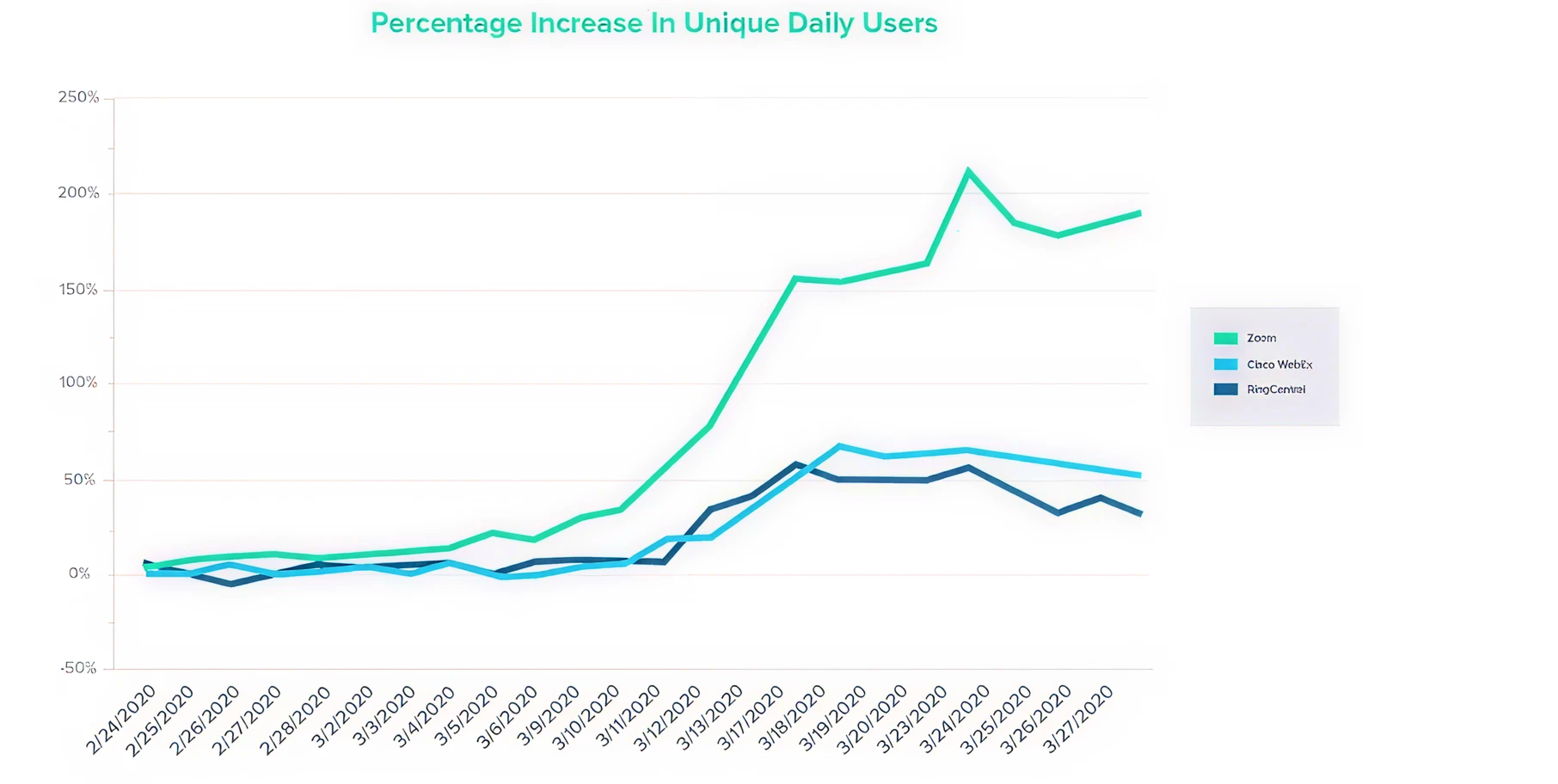
When COVID-19 struck in March 2020, everybody needed video conferencing. Zoom went from handling 10 million daily meeting participants to over 300 million in just three months. There is no gradual growth; that is a tidal wave.
A majority of platforms would have collapsed under such pressure. Zoom didn't. Why? This is due to the manner in which it designed its cloud.
Zoom runs on a hybrid cloud, primarily based on AWS and Oracle Cloud Infrastructure. However, it is not only about the availability of cloud resources, it’s about having them everywhere. Zoom has 19 data centres distributed all over the world that resemble a giant, interconnected system. When you get into a Zoom meeting, you are not connecting to a remote server on the other side of the ocean. You are connecting to the closest data centre, which significantly reduces latency and improves video quality.
The result? Zoom sustained 224% user growth in Q1 2020 with minimal downtime. "The cloud gives us the flexibility to scale up or down based on demand," Zoom's infrastructure team noted in their technical overview.
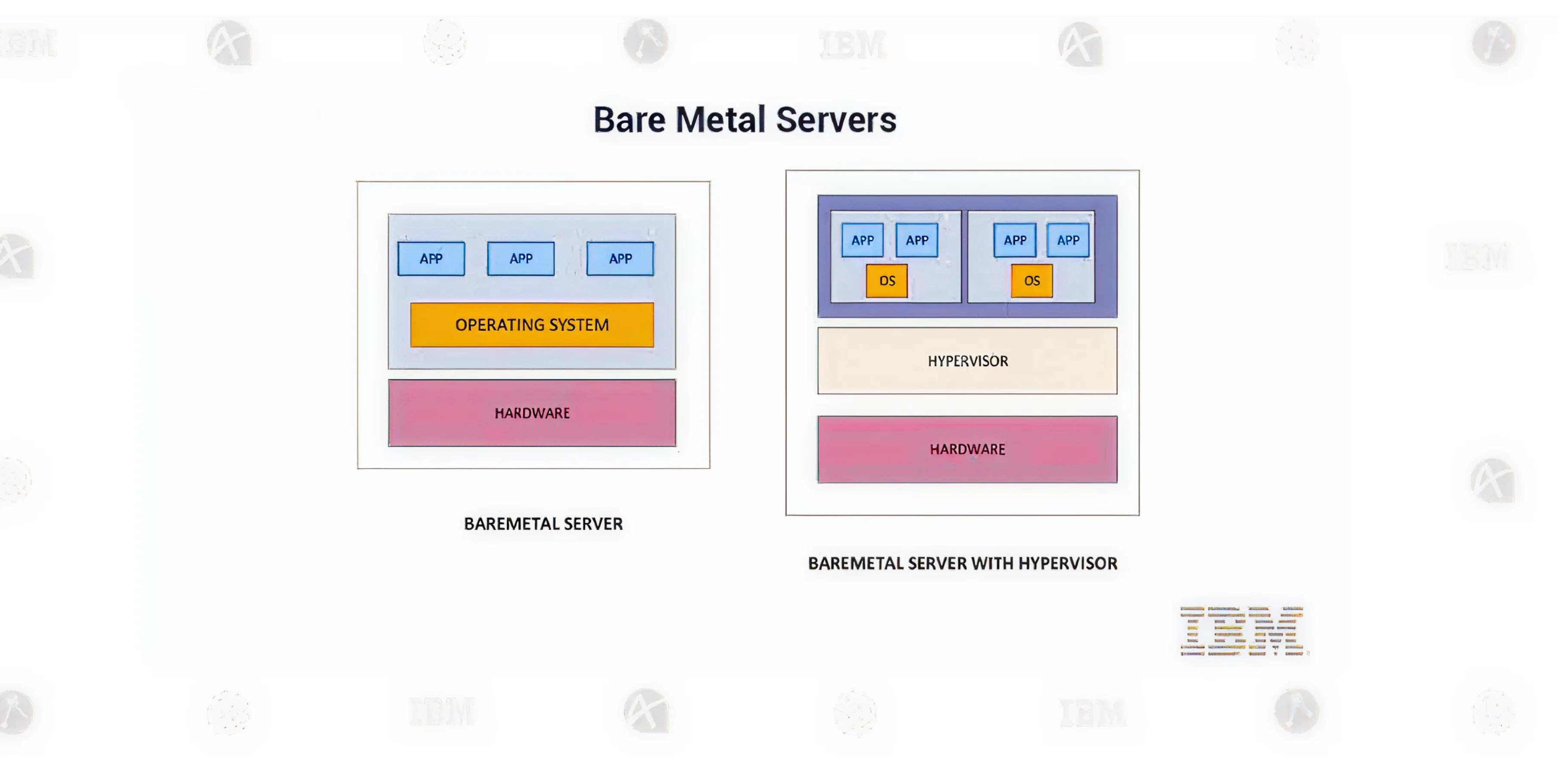
Infrastructure-as-a-Service gives you the raw building blocks of computing: virtual machines, storage volumes, networking, and load balancers. You control the operating system, middleware, and applications, while the cloud provider manages the physical infrastructure.
Example: IBM Cloud's Enterprise Approach
IBM Cloud represents the enterprise-grade side of IaaS. While AWS and Azure dominate headlines, IBM carved out a niche by offering something unique: bare-metal servers with massive specifications.
You can rent dedicated servers with up to 20 TB of RAM. Not virtual machines sharing resources,actual physical servers dedicated entirely to your workload. This matters enormously for specific use cases:
Traditional data centers required months of planning and capital expenditure for this kind of capacity. IaaS delivers it in minutes with operational expenses. If your organization is using multi cloud you need to see IBM, AWS, Azure, and GCP spending in a single dashboard. And then drill down by team, project, environment, or customer. Finally understand where money goes.
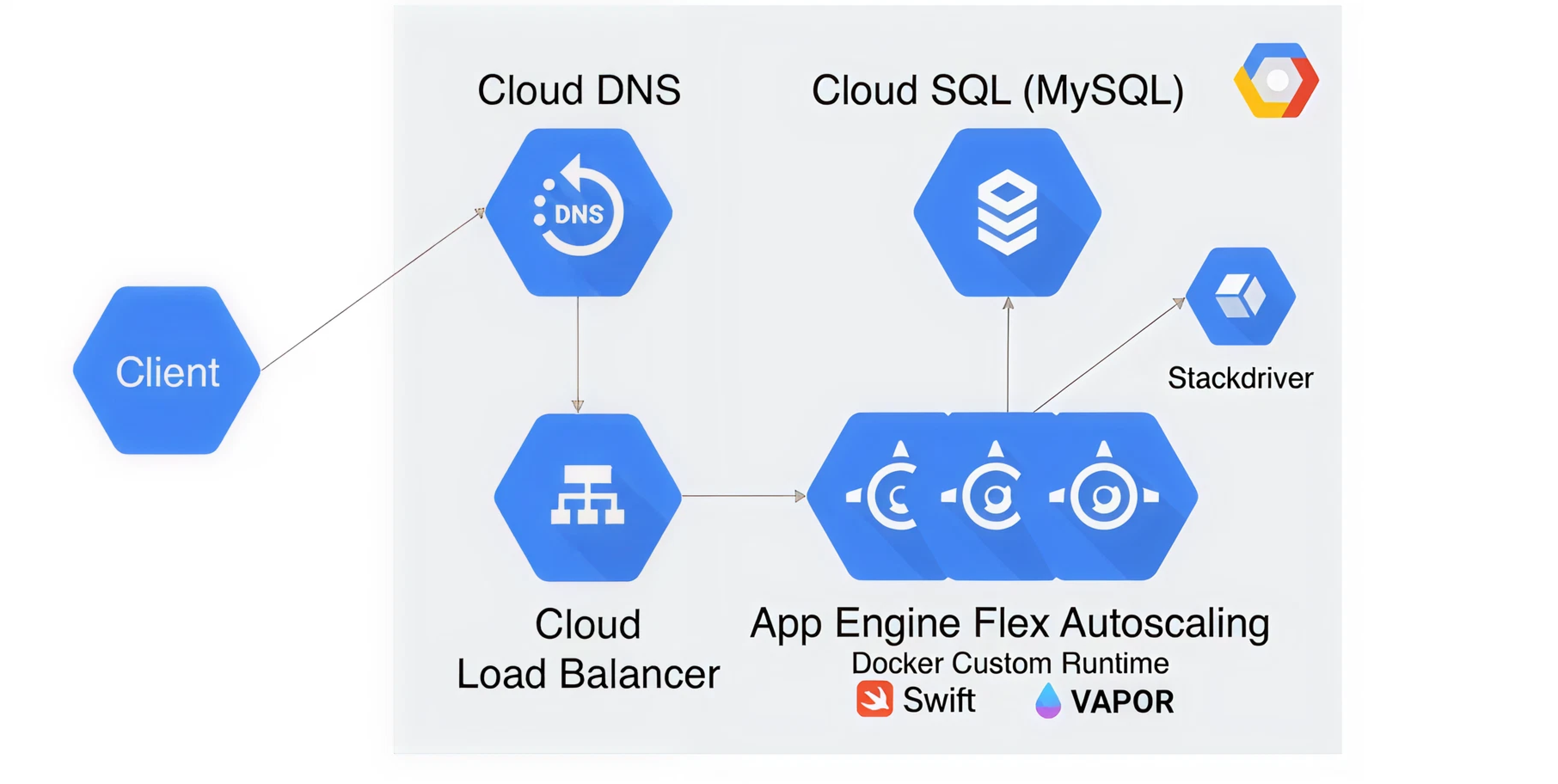
Platform-as-a-Service sits between IaaS and SaaS. It provides a complete development and deployment environment. You write code, push it to the platform, and it runs,without you ever configuring a server, installing an operating system, or managing middleware.
The Example: Google App Engine
Google App Engine exemplifies the PaaS philosophy: developers should code, not do system administration.
Here's a scenario: A startup wants to build a mobile app backend. The traditional path involves:
With Google App Engine, that entire list becomes: "Write code, run gcloud app deploy."
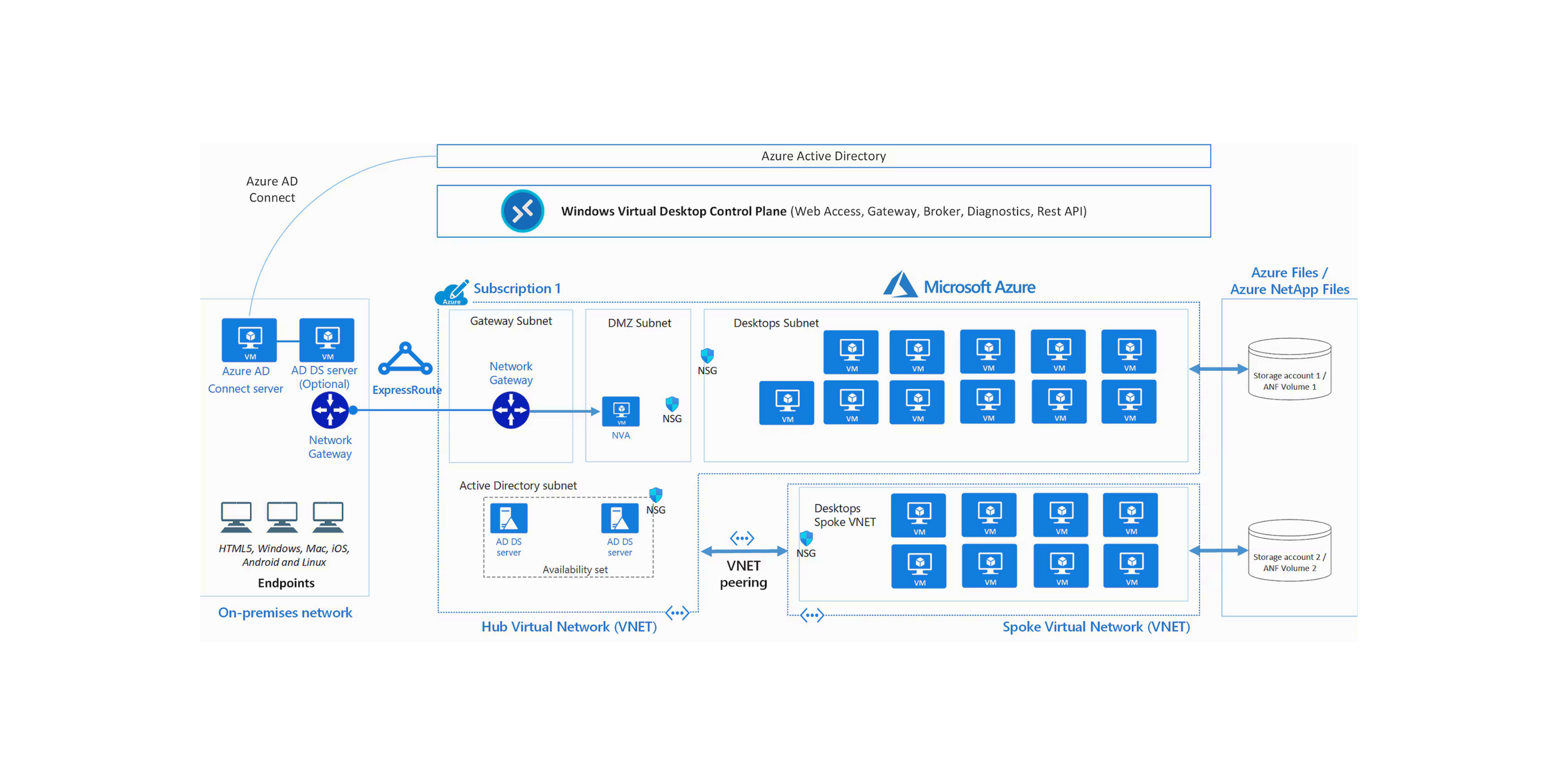
Desktop-as-a-Service virtualizes entire desktop computers in the cloud. Instead of buying physical PCs for every employee, you provision cloud-hosted desktops that people access from any device. It's your work computer, but it lives in a data center.
Example: Azure Virtual Desktop During COVID-19
When offices closed in March 2020, companies faced an immediate crisis: how do you give thousands of suddenly-remote employees secure access to corporate systems? Traditional VPNs buckled under load. Shipping laptops took weeks. Azure Virtual Desktop (AVD) became the solution for many enterprises. Companies often implement cloud service lifecycle management.
Microsoft's AVD (formerly Windows Virtual Desktop) delivers full Windows 10 or Windows 11 desktops through the cloud. From a user's perspective, it feels identical to a local PC. You log in from your home laptop, tablet, or even smartphone, and you're working in your full corporate environment with all your applications, files, and settings.
Instant deployment at scale: A healthcare company needed to enable 5,000 remote workers in two weeks. With traditional desktop provisioning (buying PCs, imaging them, shipping them), this would have been impossible. With AVD, they deployed 5,000 virtual desktops in five days. Each employee received login credentials and was working from home within hours.
Bring Your Own License (BYOL): Most organizations already have Windows and Microsoft 365 licenses. AVD lets you use those existing licenses for virtual desktops, avoiding redundant software costs. This made it economically feasible for even small businesses to deploy cloud desktops during the pandemic.
Flexible scaling: During busy periods (month-end financial close, product launches), you can temporarily provision more powerful desktops or additional instances. During slow periods, scale back. You pay only for what you use, unlike physical PCs that represent fixed costs whether they're utilized or sitting idle.
Geographic distribution: AVD can deploy desktop sessions in Azure regions worldwide. A global company might run virtual desktops in US East, Europe West, and Asia Pacific, ensuring employees always connect to a nearby data center for optimal performance.
Impact: A manufacturing company shared their experience: We had engineers who needed high-powered CAD workstations. With AVD, we provisioned virtual machines with GPU acceleration. Engineers in the field could access those powerful desktops from lightweight tablets. It completely changed how our teams worked.
Cloud storage services provide online file storage and sharing. Instead of saving files to a local hard drive, you save them to the cloud where they're accessible from any device, automatically backed up, and easily shared with others.
The Example: How Google Drive Became Essential
Google Drive has over 1 billion active users, more than the entire population of Europe. This massive adoption it’s daily utility.
Serverless computing (also called Function-as-a-Service or FaaS) lets you run code without provisioning or managing servers. You upload functions that execute in response to events. You pay only for the compute time your code actually uses,measured in milliseconds.
The Example: AWS Lambda at Scale
AWS Lambda fundamentally inverts the traditional server model. Instead of running servers 24/7 waiting for requests, you write functions that wake up only when triggered, execute, and then disappear. The cost and architectural implications are profound.
Imagine an e-commerce site that processes product images. Traditional approach: run servers continuously, waiting for uploads. Serverless approach: upload triggers a Lambda function that:
That entire process might take 800 milliseconds. You pay for 800 milliseconds of compute time. No servers running 24/7. No idle capacity.
Traditional server: $0.10/hour × 720 hours/month = $72/month (running continuously, even if idle 90% of the time)
Lambda: $0.0000166667/GB-second. For that same workload actually used 10% of the time: ~$7/month
The savings multiply for bursty or occasional workloads.
Similar FaaS platforms include Azure Functions, Google Cloud Functions, and Cloudflare Workers. For organizations looking to optimize cloud spending on serverless architectures, automated anomaly detection helps catch unexpected Lambda costs before they spiral.
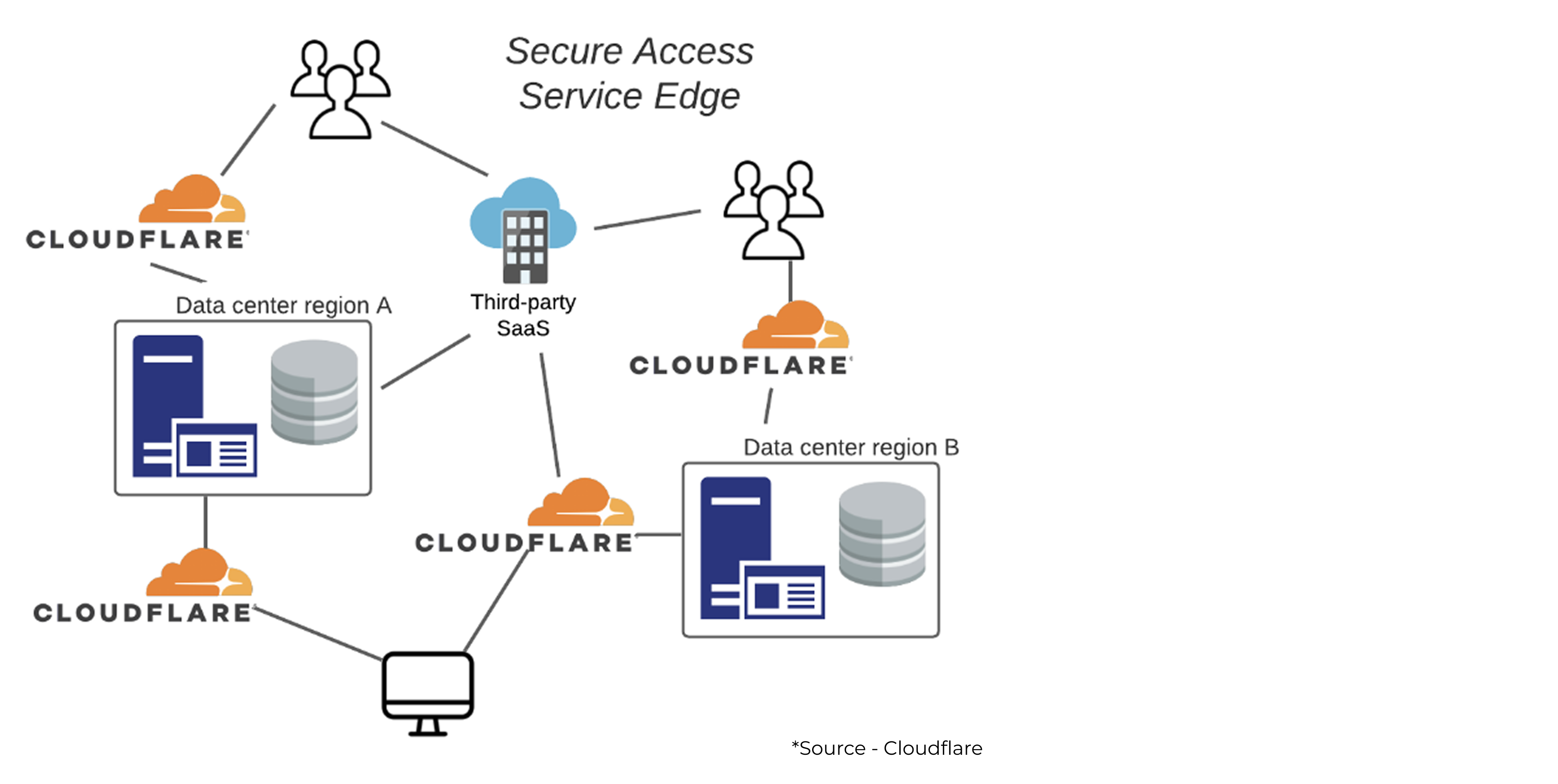
Edge computing moves processing and content delivery closer to users. Instead of routing all traffic to centralized data centers, edge networks operate thousands of servers in cities worldwide, serving content from the nearest location.
The Example: Cloudflare's 300+ City Network
Cloudflare operates edge servers in over 300 cities globally. When you visit a website using Cloudflare, you're connecting to a server potentially just miles away, not thousands of miles to some distant data center.
Cloud AI and machine learning services provide pre-built or customizable models for vision, language processing, data analytics, and prediction. Instead of building AI infrastructure from scratch, you leverage cloud providers' platforms, GPUs, and pre-trained models.
The Example: Disney's Automated Content Library
Disney owns one of the world's largest entertainment libraries: nearly a century of animated classics, live-action films, documentaries, and TV shows. Finding specific footage,say, all underwater scenes with marine life,was nearly impossible without watching everything manually.
AWS's machine learning tools solved this problem.
Disney's team trained deep learning models using AWS SageMaker to recognize characters, objects, settings, and actions across their entire content library. The system can identify:
This creates rich, searchable metadata. When a filmmaker working on a new movie needs reference footage of "princesses in ballrooms," the AI-tagged library instantly surfaces relevant clips from decades of films.
According to Disney's engineering team: "AWS has been a key partner in Disney's transition from traditional machine learning to deep learning. The platform allows our team to rapidly experiment with new models and scale them to production."
Business impact: This AI-powered organization doesn't just help filmmakers find footage,it enables personalized recommendations on Disney+, powers search functionality, and helps with content licensing decisions. The same technology that tags "underwater scenes" can tag content for age-appropriateness, genre classification, and regional preferences.
Cloud big data and analytics services process massive datasets using distributed computing. Think data warehouses, real-time streaming platforms, and analytics engines that can query petabytes of information.
Netflix: Streaming at Petabyte Scale
Netflix is perhaps the ultimate cloud big data story. After a major data center outage in 2008, Netflix made a bold decision: move everything to AWS. Not just some workloads,everything.
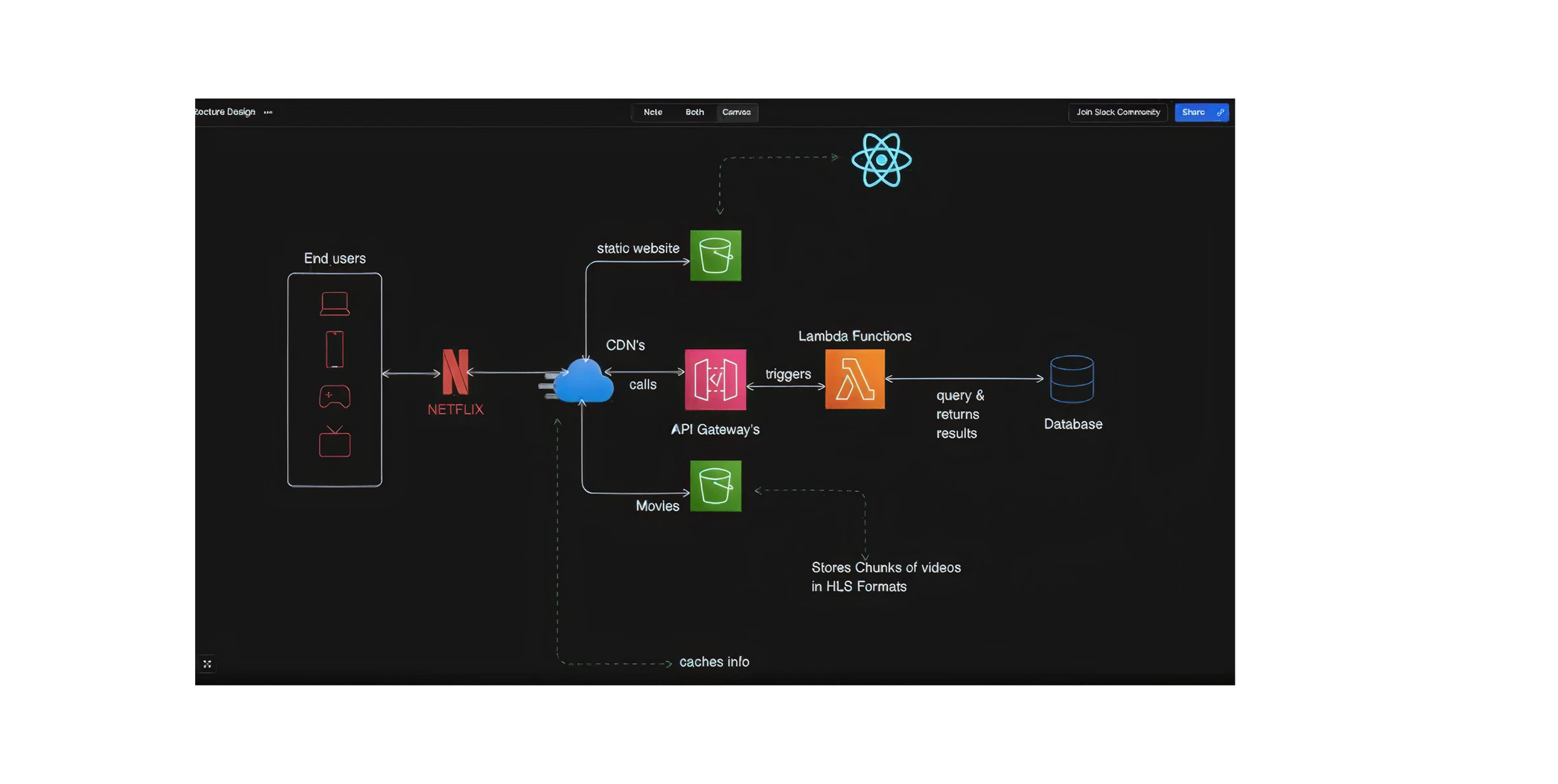
Netflix recently announced they're optimizing their massive $1 billion annual AWS bill. At that scale, even small inefficiencies become expensive. This is where cloud cost management becomes critical. Netflix tracks every byte of stored data, every compute hour, and every API call to find savings opportunities.
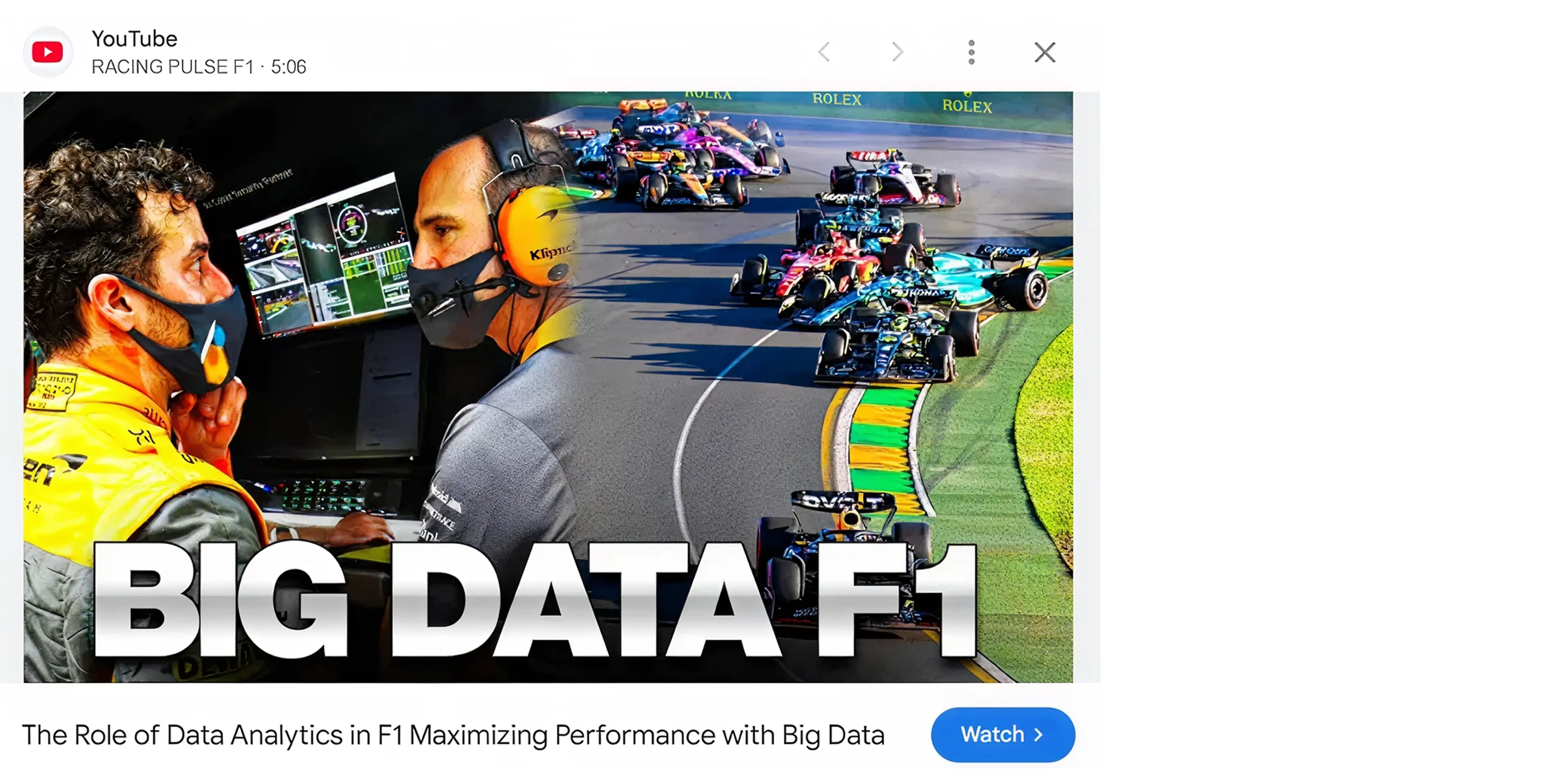
Formula 1 represents real-time analytics at the extreme. During a race weekend, F1 cars generate over 1.5 billion data points from 300+ sensors. That data must be collected, analyzed, and delivered to teams and broadcasters in real-time. There’s an entire video on this, which covers more, but let’s see more on their partnership.
According to F1's CTO: "AWS outperforms all other cloud providers in speed, scalability, reliability, global reach, and breadth and depth of cloud services available."
Key platforms include AWS Redshift (data warehousing), Google BigQuery (serverless analytics), Azure Synapse (unified analytics), and Snowflake (cloud data platform). Organizations managing multi-cloud analytics often need a centralized cloud analytics platform to understand spending across platforms

Container-as-a-Service (CaaS) platforms provide managed environments for running Docker containers and Kubernetes clusters. Containers package applications with their dependencies, making them portable across any environment.
Modern applications are built as microservices: small, independent components that work together. Containers are the ideal deployment unit for microservices. Instead of running monolithic applications on large VMs, you run dozens or hundreds of containers that can be updated, scaled, and managed independently.
Containers make scaling easy,sometimes too easy. Teams can spin up hundreds of containers, and costs accumulate quickly. Without proper governance, Kubernetes clusters can become expensive. This is why Kubernetes cost optimization is critical for teams running containerized workloads. Right-sizing pods, implementing auto-scaling policies, and tracking usage per service prevents waste.
Cloud computing powers everything from Zoom calls to Netflix binges, from Disney animations to Formula 1 races. Each cloud type,SaaS, IaaS, PaaS, DaaS, serverless, edge, AI/ML, big data, containers, and HPC,solves different problems in different ways.
The question isn't whether to use cloud computing. The question is: which cloud models fit your needs, and how do you manage them cost-effectively?
The cloud unlocked incredible possibilities. Companies like Disney, Zoom, Netflix, and Formula 1 demonstrate what's achievable when you leverage the right cloud services effectively.
Your turn to build something remarkable. Just make sure you're not paying for capacity you don't need while doing it.
Ready to optimize your cloud costs without sacrificing performance? Costimizer provides the visibility, automation, and intelligence you need to manage AWS, Azure, and GCP spending effectively.
See exactly where your money goes. Stop paying for waste. Scale with confidence.
Start Your Free Trial – Get complete cloud cost visibility in under 10 minutes.
Questions? Want to see how much you could save? Schedule a demo with our team. We'll analyze your current spending and show you specific optimization opportunities.
Join hundreds of companies using Costimizer to reduce cloud costs by 25-63% while accelerating innovation.
SaaS, IaaS, PaaS, Serverless, Edge, AI/ML services, Storage, Big Data, DaaS, and Container/Kubernetes.
Match the model to your workload’s needs: speed → PaaS, control → IaaS, bursts → serverless, global latency → edge.
Yes. Most modern architectures blend several types to balance performance, cost, and flexibility.
Mostly due to unused resources, over-provisioning, and lack of ownership or visibility.
Only for bursty or short-running workloads. Long-running tasks are cheaper on VMs or containers.
Automation, strict governance, clear tagging, and continuous monitoring.
Containers run long-lived services; serverless runs short-lived event functions. Containers = control. Serverless = simplicity.
•
CTO•
Articles