Your cloud bill is likely higher than it needs to be. Every day, companies pay full retail price for Google Cloud processing power, treating expensive servers like permanent fixtures. Meanwhile, vast amounts of perfectly good computing capacity sit idle in Google’s data centres.
Smart engineering teams have learned how to rent this unused capacity for a fraction of the cost, slashing their bills by up to 91% without slowing down their operations.
This blog explains exactly how you can stop overpaying for cloud infrastructure, safely use discounted capacity, and keep your business running smoothly using the right GCP Cost optimization tools.
To understand how to save money, you first need to understand how cloud providers operate. Google builds massive data centres with enough hardware to handle extreme traffic spikes for its top-tier enterprise customers. Because traffic fluctuates, a large percentage of this hardware sits unused on any given day.
An idle server costs Google money in power and space while generating zero revenue.
To solve this, Google rents out this excess capacity as "Spot Virtual Machines" (Spot VMs) at a heavy discount.
You get the exact same high-performance processors, memory, and networking as customers paying full price.
The catch is simple: if a customer paying full retail price suddenly needs that capacity, Google will take the machine back from you. This is called "preemption."
The Economics of Spot Pricing: The financial benefit is massive. Unlike GCP sustained use discounts, which apply based on consistent usage, Spot VMs offer immediate cost reductions.
This applies to standard processors, high-performance Graphics Processing Units (GPUs), and high-speed local storage (Local SSDs). If your monthly compute bill is $10,000, moving eligible tasks to Spot VMs could drop that specific line item to roughly $1,000.
The Free Tier Exception: Many new projects start using the Google Cloud Free Tier, which provides a small monthly allowance of standard resources.
It is critical to know that these standard Free Tier monthly allowances do not apply to Spot VMs. If you launch a Spot VM, you will be billed for it immediately at the discounted rate.
However, if you are a new customer using the initial $300 Free Trial credit, you can apply those trial credits toward Spot VM usage.
Spot VMs vs. Preemptible VMs: If your team has used Google Cloud for several years, they might mention "Preemptible VMs." Spot VMs are the modern replacement for this older system. The older Preemptible VMs had a frustrating hard limit: Google would automatically shut them down after exactly 24 hours, regardless of network demand.
Spot VMs remove this restriction entirely. A Spot VM will continue running indefinitely until Google actually needs the capacity back.
Feature | Standard VM | Spot VM | Preemptible VM (legacy) |
Price vs. on-demand | Full price | 60–91% off | 60–91% off |
Maximum runtime | Unlimited | Unlimited | 24 Hours |
Can it be preempted? | No | Yes | Yes |
Covered by SLA? | Yes | No | No |
Suitable for databases? | Yes | No | No |
GPU/Local SSD support? | Yes | Yes (discounted) | Yes (discounted) |
Free Tier credits apply? | Yes (some) | No | No |
When a CFO hears that Google can take a server back "at any time," it sounds dangerous. It sounds like someone pulling the power cord out of the wall while you are working. The reality is much more controlled. Understanding the exact shutdown sequence removes the fear and allows your team to prepare safely.
The 30-Second Warning: When Google needs your rented server back, they do not just delete it instantly. The Google metadata server sends a specific electronic warning to your machine. In technical terms, this is an ACPI G2 Soft Off signal.
Think of this like a landlord giving you a formal notice to vacate. From the exact moment this signal arrives, your server has exactly 30 seconds of guaranteed life remaining.
Forced Shutdown During this 30-second window, your machine is supposed to run an automated "shutdown script." If your team has not written a script, or if the script takes 31 seconds to finish, Google intervenes. At the 30-second mark, Google sends an ACPI G3 Mechanical Off signal. This cuts the power forcefully. The server is stopped.
How to Use the 30 Seconds: Your engineering team must treat those 30 seconds as a highly rehearsed fire drill. You gain absolute reliability by ensuring the machine cleans up after itself before the power goes out. Your team should write a script that performs the following actions:
If your team builds the system to expect these 30-second drills, your business will never notice when a machine is taken away.
Using discounted servers is highly profitable, but applying them to the wrong part of your business will cause outages. Spot VMs are designed strictly for fault-tolerant workloads. This means the specific task can be paused and restarted later without angering a customer or losing critical data.
When You Will Gain Value (Best Cases)
When You Will Lose Money (Worst Cases)
While the official documentation makes Spot VMs sound like an infinite pool of cheap computers, the reality on the ground is different. While discussing with developers and CFOs, it feels like it is the biggest pain point of modern businesses: getting your hands on cheap AI hardware is incredibly difficult.
The Current Problem: Companies are rushing to build Artificial Intelligence tools. This requires highly specialised processors called GPUs, specifically models like the NVIDIA L4 or the A100. Because every major tech company is buying up this exact hardware, Google has very little excess GPU capacity available.
If you try to launch a Spot VM attached to an A100 GPU, you will likely encounter an error stating that resources are unavailable.
Your automated systems might wait four or five hours just hoping a cheap GPU becomes free. For a business trying to stick to a schedule, hoping cannot be a strategy.
The Practical Solution: Instead of repeatedly trying to launch a Spot VM and failing, your team should use a newer Google feature called the Dynamic Workload Scheduler (DWS).
The DWS has a feature called "calendar mode." Instead of fighting for spare parts in real time, calendar mode allows your team to request a start time up to 14 days in advance.
You tell Google exactly when you need the GPUs and how long you need them for (up to seven days). Google guarantees the hardware will be ready for you at that specific time. While this does not provide the 91% discount of a Spot VM, it completely solves the scarcity problem for high-value AI projects that cannot afford to be delayed.
You can build a highly resilient system on top of cheap, unreliable hardware. However, for predictable workloads, GCP Committed use discounts may offer better long-term savings.It just requires the right architectural design. Here is how top engineering teams keep their systems online while paying pennies on the dollar.
1. Leverage Managed Instance Groups (MIGs): You should never launch a single Spot VM manually and leave it alone. You must place your machines inside a Managed Instance Group (MIG).
A MIG is an automated management layer. When Google reclaims your Spot VM, the MIG immediately notices the machine is missing.
The MIG will automatically ask Google for a new Spot VM to replace the lost one. As soon as excess capacity opens up again, the MIG rebuilds your server without human intervention.
2. The Dual-Pool Turbo Mode Strategy
You do not have to choose between expensive reliability and cheap unpredictability. You can blend them.
Imagine an e-commerce website during a holiday sale. Your engineering team sets up a traffic director (a Load Balancer). Behind this director, they create two pools of servers.
The first pool contains a small number of standard, full-price VMs. These machines guarantee that your core website and checkout pages never go offline.
The second pool contains a massive number of cheap Spot VMs. This acts as your "turbo mode." When thousands of users log on simultaneously, the Spot VMs process the heavy product searches and image loads.
If Google takes the Spot VMs away, the website might load slightly slower, but the standard VMs ensure the business stays open. You get a massive scale at a fraction of the cost.
3. Implement Zone Hopping: Cloud providers divide their data centres into physical locations called Regions and smaller sections called Zones.
Sometimes, one specific Zone runs completely out of excess capacity because a large customer just spun up thousands of machines. If your application only looks for cheap servers in "Zone A," your system will stall.
Your team must design the application to check multiple zones automatically. If cheap capacity dries up in Zone A, your system should request resources from Zone B or Zone C.
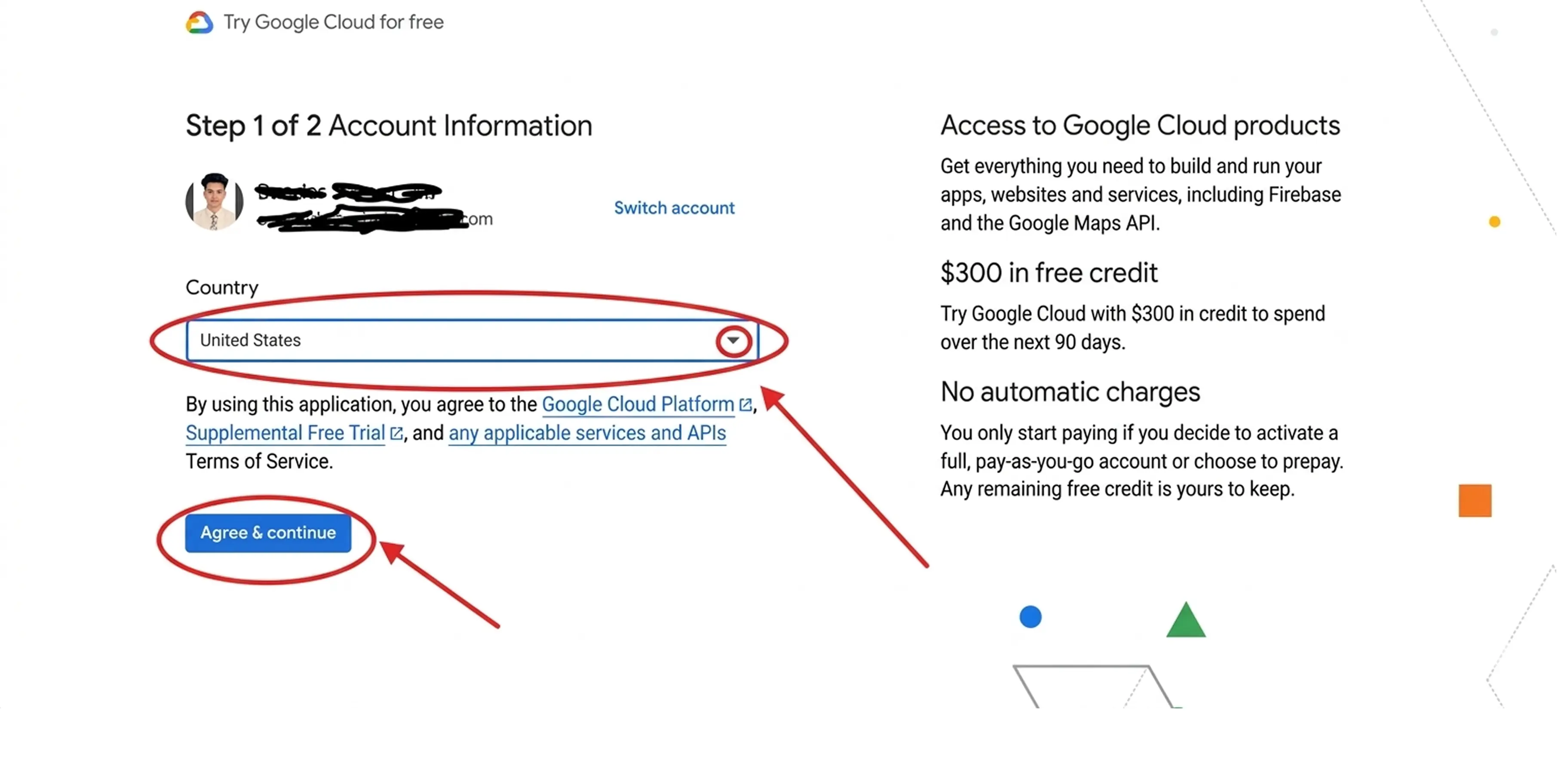
If you want to verify how simple this is to implement, you can test it directly in your Google Cloud account today. The process takes less than two minutes.
Step 1: Log in to the Google Cloud Console. Navigate to the Compute Engine section and click the "Create Instance" button at the top of the screen.
Step 2: Name your machine and select your desired region and hardware configuration just as you normally would.
Step 3: Scroll down and expand the menu labeled "Advanced Options."
Step 4: Open the "Management" tab. Look for the section labeled "Availability Policies."
Step 5: You will see a dropdown menu for the "VM provisioning model." By default, it is set to Standard. Click this menu and change it to "Spot."
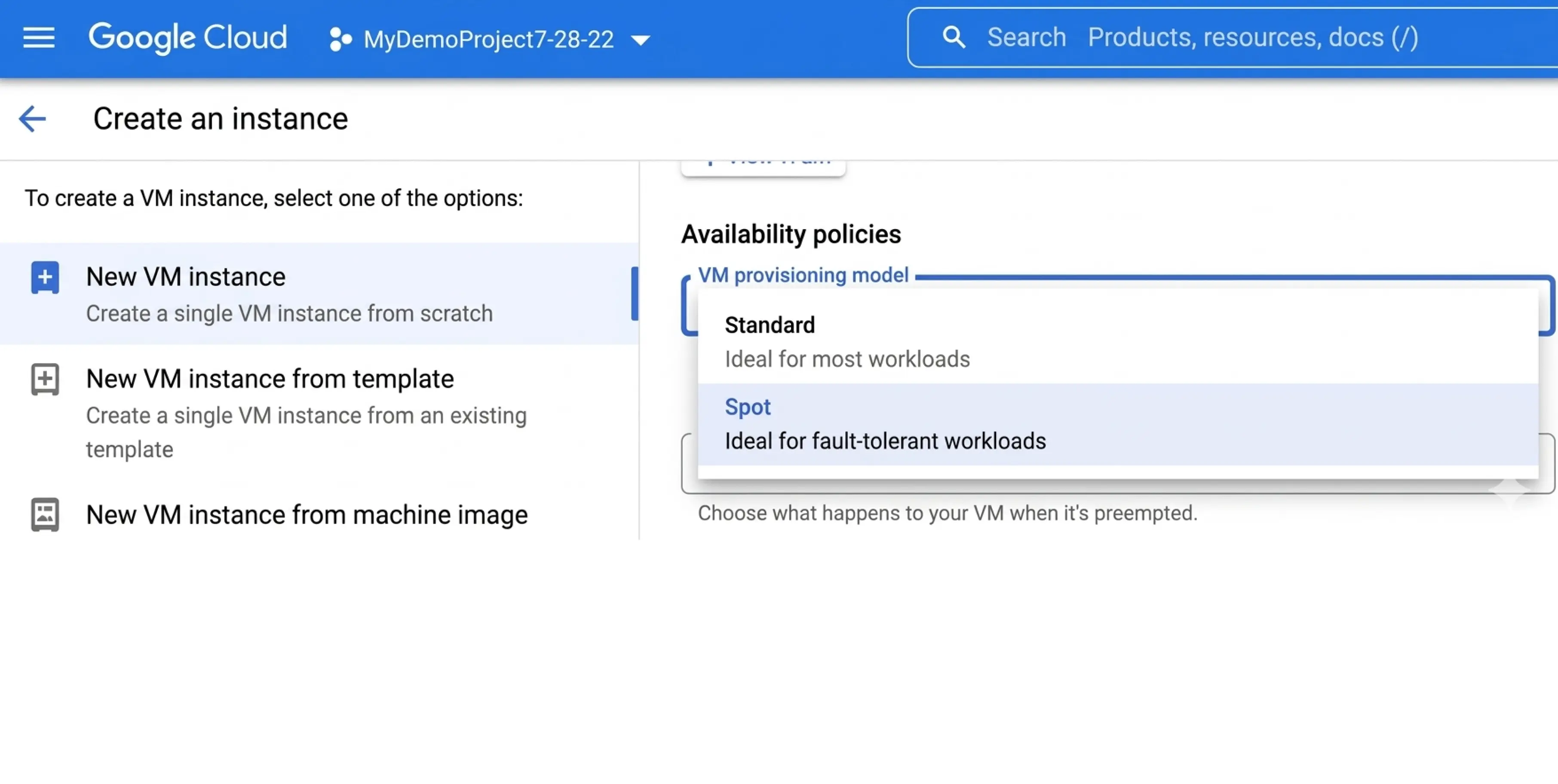
Step 6: Choose your termination action. You can instruct Google to either "Stop" the machine (saving the attached disk data) or "Delete" the machine entirely when they reclaim the capacity. Click create, and your discounted server will boot up.
Your company relies on the cloud to scale, but scaling should not mean accepting unpredictable, skyrocketing monthly bills.
We have seen the exact problem you face: managing discounted cloud capacity is exhausting, manual work. To use Spot VMs safely, your engineering team is forced to constantly monitor for 30-second shutdown warnings, build complex recovery scripts, and desperately hunt for scarce server space across different time zones.
Because this is so difficult to manage by hand, most businesses rely only on Google Budget Alerts and eventually surrender to rising cloud costs. They overpay for full-price, permanent servers just to feel safe, and watch their profit margins vanish into idle infrastructure.
You need a system that executes these cost-saving strategies automatically.
Costimizer serves as your financial guardian. Instead of paying expensive engineers to manually babysit your servers, Costimizer’s AI agent handles it for you using real-time GCP Cost anomaly detection and automated optimization. It constantly monitors your traffic, safely shifts your eligible tasks to heavily discounted Spot VMs, and instantly rebuilds your servers if Google reclaims the capacity.
You get the peace of mind that your performance remains flawless, your team stays focused on product growth, and your monthly cloud bill drops reliably.
Stop funding your cloud provider's empty server racks. Reclaim your budget today by trying Costimizer to see exactly how much cash is hiding in your infrastructure.
No, you cannot stack discounts. Spot VMs are already discounted up to 91%, so Google does not apply long-term CUDs or Sustained Use Discounts (SUDs) to them. You should use CUDs strictly for your baseline, full-price servers.
Our agent continuously monitors live capacity metrics. If Spot availability drops to zero, Costimizer automatically falls back to your standard baseline servers or shifts the workload to a neighbouring zone before your application experiences downtime.
It depends on your settings. By default, the attached drive is deleted when the machine shuts down. However, you can configure the instance to simply "stop," allowing you to preserve the Persistent Disk and attach it to a new machine later.
No, there are no early termination fees or hidden penalties. Google Cloud bills by the second, so if your Spot VM is preempted after exactly 14 minutes, you only pay for those 14 minutes at the discounted rate.
Costimizer maps your cloud inventory and identifies waste within 15 minutes of connecting. Once you enable automated Spot orchestration and rightsizing, most companies see a measurable drop in their daily compute costs within the first billing cycle.
GKE fully supports Spot VMs through dedicated "node pools." You can configure GKE to automatically route your flexible, stateless containers to a pool of cheap Spot machines while keeping your critical APIs safely on standard hardware.
Not at all. Spot VMs run on the exact same physical hardware and use the identical enterprise-grade encryption and isolation protocols as full-price machines. The only difference is the guarantee of uptime, not data security.
No, you always set the exact guardrails. You can run Costimizer in "recommendation-only" mode to manually approve every change, or you can allow the AI to act autonomously only on specific, low-risk development projects.
•
CFO•
Articles