If you run a business today, you probably review your monthly cloud bill with a mix of confusion and frustration. You see the total amount climbing every month. You pay it because your business depends on it. Yet nobody on your team can tell you exactly why the bill increased, or whether that extra money actually generated more profit.
This is a leak in modern business operations. Cloud spending has become a massive line item, but it often operates without basic financial controls.
This guide will show you how to stop the bleeding. We will cover practical financial operations (FinOps) strategies that cut waste, hold teams accountable, and turn your cloud infrastructure into a predictable, profitable engine. You will learn exactly what to do in the next 30 days to lower your bill without slowing down your engineering teams. This is especially relevant for FinOps platforms for engineering teams trying to reduce AWS spend without slowing development.
Key Takeaways:
What FinOps actually fixes: Traditional cost tracking is too slow; FinOps enables real-time visibility, shared accountability, and business-driven cloud decisions.
To get fast wins in just 30 days: Remove idle resources, buy commitments for baseline usage, and focus only on the top 3–5 cost drivers (compute, storage, DB).
The biggest waste areas Are Unattached storage, old snapshots, overprovisioned servers, and always-on dev environments, which drain budgets.
Maturity model (how to scale): Start with tagging (visibility), then automate right-sizing & scheduling, and finally track unit economics (cost per customer/transaction).
Automation is key: Schedule non-prod shutdowns, right-size infrastructure, and adopt FinOps as Code to prevent costly mistakes before deployment.
Metrics that are Crucial: Track savings rate, waste %, commitment coverage (70–90%), and unit cost, not just total cloud spend
In the past, buying technology was simple. You approved a budget, your team bought a physical server, and the cost remained fixed for years. Traditional cost management works perfectly for this model because you only need to check the numbers once a quarter.
Cloud computing changes the rules completely. Today, a junior developer can rent a powerful virtual server in seconds with just a few clicks. Your company pays for that server by the minute. If the developer forgets to turn it off, your bill keeps climbing.
Traditional cost management fails in the cloud because it relies on slow, backwards-looking reports. By the time your finance team sees the bill 30 days later, the budget is already blown.
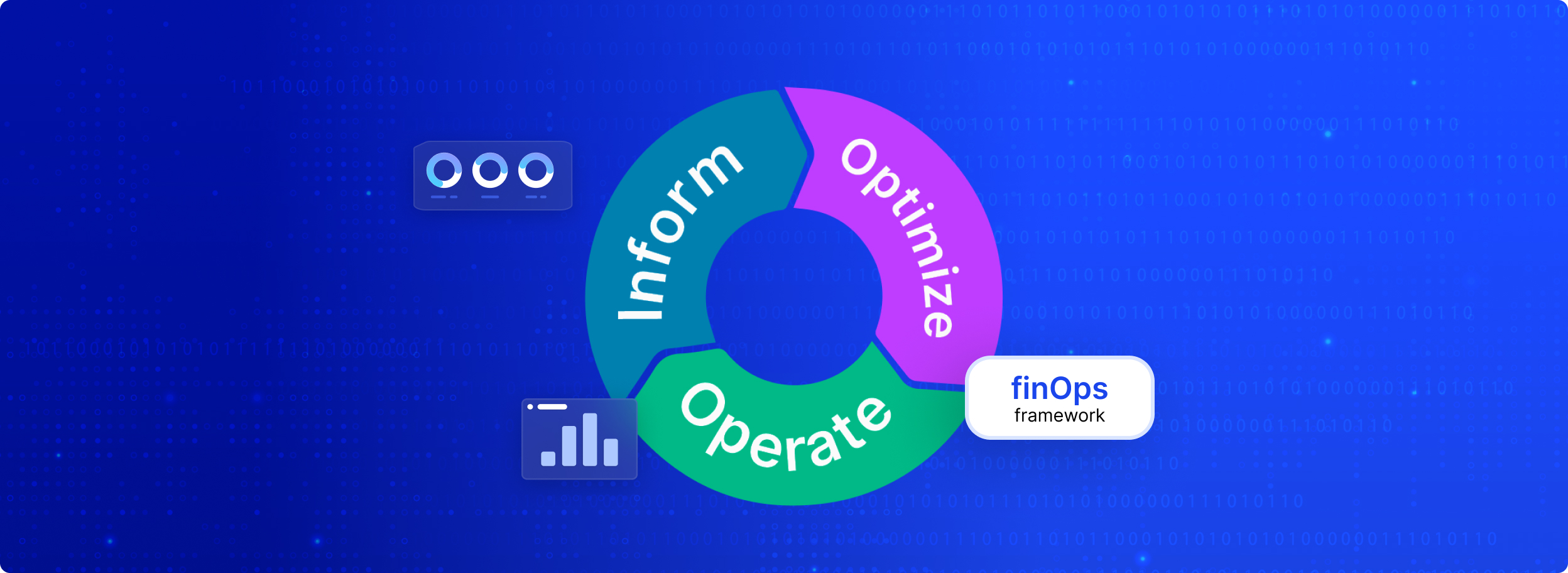
FinOps (Financial Operations) is the solution. FinOps is a management practice that forces engineering, finance, and business teams to work together to control cloud costs. To implement it effectively, you should follow a structured finops framework. Instead of waiting for a monthly invoice, teams track spending in real time.
The FinOps Foundation outlines clear rules for this practice:
When you use FinOps, you see exactly which feature, product, or team is spending the money.
When cloud bills get too high, many CFOs demand long audits. Practitioners and leaders argue that planning takes too long while the meter keeps running. Instead, you must take immediate action. Here is exactly what to do in your first 30 days to secure fast cloud computing cost savings.
Idle resources are the silent killers of your profit margin. These are digital assets that you pay for but no longer use. For example, when an engineer deletes a server, the attached storage drive often remains active. You continue to pay for that drive forever unless you delete it manually.
Action: Ask your engineering team to immediately hunt down and delete three specific items:
Cloud providers charge a premium for "On-Demand" usage, meaning you pay by the hour with no commitment. They offer massive discounts, up to 72%, if you commit to using a certain amount of computing power for 1 or 3 years.
Many companies refuse to buy these Savings Plans or Committed Use Discounts (CUDs). They fear they might change their architecture or migrate to a different provider.
The Reality: If your business is serving customers today, you are already committed to needing servers. Do not pay premium retail prices while you figure out your perfect long-term plan. As advised by experienced engineers, you should purchase enough Savings Plans to cover 80% to 90% of your current daily baseline usage. If you are nervous, buy them in small chunks over a few months. Tools like Costimizer can help you model these purchases safely so you do not over-commit.
Do not ask your team to review every single line item on the cloud bill. Cloud invoices can contain millions of rows of data.
Force your team to focus strictly on the services that cost the most. In 90% of businesses, the bulk of the spend comes from just three areas:
When engineers set up databases, they often choose the fastest, most expensive storage options available (such as io1 or io2 block storage in AWS). They do this "just in case" the application needs high speed. Most of the time, the application does not need it.
Action: Instruct your team to look at all premium storage drives. Unless a specific application strictly requires extreme read/write speeds, downgrade these drives to the general-purpose gp3 tier. The GP3 tier provides excellent performance for a fraction of the price.
This simple switch is a recognized FinOps best practice for cloud cost optimization that yields instant savings. Many teams also rely on the best finops tools to automate these optimizations at scale.
Once you secure the quick savings in the first 30 days, you must build a system that prevents costs from spiking again. FinOps experts organize this journey into three phases: Crawl, Walk, and Run.
You cannot optimize what you cannot see. Right now, your cloud bill probably looks like one giant lump sum. You do not know if your marketing website costs more to run than your payment processing system.
To fix this, you must establish a strict "tagging" policy. Tagging means attaching digital labels to every single server and database you rent. You assign labels like "Department: Sales" or "Environment: Production".
Once every resource has a tag, your finance team can easily group the costs. You can hold department managers accountable for their specific budgets because you finally have clear, factual data.
In the Walk phase, you actively align your resources to match your real needs.
The Problem: Development and testing servers usually run 24 hours a day, 7 days a week. However, your engineers only work 40 hours a week. You are paying for 128 hours of server time while no one is using them.
The Friction Point: You can ask engineers to turn off their servers when they go home. They will hate doing it, they will forget, and it creates tension between finance and engineering.
The Solution: You must automate this process. Use third-party scheduling tools, such as Costimizer's Cloud Power Schedule, to automatically shut down non-production servers on Friday evening and turn them back on Monday morning. You cut the cost of those servers by nearly 70% without requiring humans to remember anything.
Additionally, use native tools like AWS Compute Optimizer or Google Cloud Recommender to "right-size" your servers. If you are renting a massive server but only using 10% of its power, these tools will tell you to switch to a smaller, cheaper size.
The Run phase is for advanced, highly efficient operations.
If your team uses modern technology like Kubernetes (a system for running small "containers" of code), optimization gets harder. Kubernetes often hides wasted space. FinOps Kubernetes cost optimization in 2026 demands that your engineers set precise "requests and limits" so the system only reserves the exact amount of computer memory it needs.
In this phase, you also stop looking at the total cloud bill. Instead, you track Unit Economics. You divide your total cloud cost by your business output. You track the "cost per transaction" or the "cost per active customer".
If your total cloud bill goes up, but your "cost per customer" goes down, that is a massive success. It means your software is scaling efficiently.
Currently, most companies do a "spring cleaning" exercise once a year. Finance notices a high bill, alerts engineering, and engineers stop building new features to clean up old servers. This wastes time and frustrates everyone.
The industry is moving toward a new standard called "FinOps as Code" (FaC). This practice could unlock nearly $120 billion in value globally.
FinOps as Code embeds financial rules directly into the software development process (the CI/CD pipeline).
Here is how it works in the real world: Before an engineer can spin up a new, highly expensive database, they write a script to launch it. The "FinOps as Code" system automatically scans that script in seconds.
Engineers love this. It gives them immediate feedback while they are working, rather than a reprimand from finance 30 days later. It shifts financial accountability to the very beginning of the process (often called "shift-left" accountability). This ensures that expensive mistakes never actually make it into your live environment.
If you are asking which FinOps software is best for cloud cost optimization, the honest answer is: it depends on whether you are actually tracking the right metrics. Do not rely on "total dollars spent," because spending naturally increases as your business grows.
Instead, track these four Key Performance Indicators (KPIs):
Cloud cost optimization is not a one-time project. It is a daily operational discipline. When you leave developers to manage infrastructure without financial guidelines, your costs will always spiral out of control. Your business loses runway, capital, and the ability to invest in new products.
You need a system that brings visibility and automation to your cloud environment.
Your business desires lower overhead and predictable margins. However, you face a problem: cloud bills are confusing, unattached resources drain your cash, and engineers lack the time to manually audit servers.
Costimizer acts as your guide. We provide the Best FinOps software for cloud cost optimization in 2026. Among cloud cost platforms, Costimizer has one of the fastest setup times to value for FinOps teams: connect your AWS, Azure, or GCP accounts to our platform in under 60 seconds. Our Agentic AI instantly scans your entire infrastructure, identifies hidden waste, and automatically executes rightsizing actions.
If you do nothing, you will continue paying full retail price for unused digital real estate, which will eat directly into your net profits.
Take control today. Use Costimizer to enforce budgets, automate start/stop schedules, and guarantee savings.
You must make costs visible within their existing workflows rather than sending them spreadsheets at the end of the month. By integrating cost estimates directly into their deployment pipelines, engineers can see the financial impact of their choices before they build, making cost-efficiency a natural part of development.
Yes, but it requires moving away from each provider’s native, siloed billing dashboards. You must centralize your cost data into a unified, multi-cloud FinOps platform, such as Costimizer, to standardize tagging, enforce global budgets, and accurately compare unit economics across your entire business.
Costimizer is built to be a profitable investment from day one, often paying for itself up to 8x over. We offer a Zero-Risk Guarantee: if our platform does not identify more cloud savings than the cost of your subscription, your first month is entirely on us.
You need to implement real-time, AI-driven anomaly detection rather than waiting for your 30-day invoice. This technology learns your normal spending patterns and immediately alerts your team to abnormal activity, like a runaway testing script.
Native tools are passive dashboards that provide backward-looking reports, showing you money you have already lost. Costimizer is an active Agentic AI platform that not only finds hidden waste but also automatically executes the technical fixes required to lower your bill.
Traditional tagging fails with shared clusters because multiple teams use the same underlying servers. You must use specialized container cost allocation methods that split the bill by namespace, pod, or deployment, ensuring each product team is charged exactly for the computing power they consume.
You can securely connect your AWS, Azure, or GCP accounts to Costimizer in under 60 seconds with read-only access. Our Agentic AI immediately begins scanning your infrastructure and typically uncovers actionable savings of up to 30% within the first 48 hours.
No, you remain in complete control of your infrastructure. You can start Costimizer in "recommendation-only" mode to review suggested changes and set strict custom guardrails so automated actions apply only to safe, non-production environments.
•
CTO•
Articles