With Costimizer, you never miss out on the intended cloud compute cost savings.
We recently came across a 2025 survey that revealed that 82% of companies report higher cloud bills. Our team (Costimizer) started researching why we are facing this issue. Of course, there could be many reasons for it, but in our analysis (>90% of the cases), it is almost always a failure of process and culture.
To give you more context, earlier teams used to get a traditional on-premises setup, because getting a new server was a slow, bureaucratic process involving procurement, budgets, and physical installation. This was helpful to companies in some way or another, as they spent less because the process took longer.
Now in the cloud, even a junior developer can instantly provision a powerful server via an API. The cost is bound to go up, but worry not: there are new ways to help you regain control of costs.
This guide explores exactly how you can regain control.
We will break down the most expensive mistakes companies make and provide a detailed playbook to fix them. Meanwhile, you can take a 14-day free trial to check how Costimizer can help you!
60-Second Summary
Companies can actually save costs without putting the brakes on innovation or development.
You should consider the following fundamental areas to minimize your cloud overhead:
Use this cycle for best results:
To get more clarity, read the entire blog; you're guaranteed to find a solution here!
Before we can fix the invoice, we have to understand the mindset that created it. The cloud’s greatest feature, ease of use, is also its greatest financial risk.
When resources feel infinite and instant, engineers naturally develop a bias toward safety. When a developer cannot be sure of the amount of memory required by an application, they will hardly ever pick the smaller one to save the company 50$ a month. To avoid the application crashing, they will select the larger option.
It is not ill intent but logical. The engineers are motivated by uptime, performance, and delivery speed. They are not often motivated towards cost efficiency.
It results in a sprawling digital estate where expenses go unseen until the month-end. To resolve this, you do not just need better software; you need to shift the engineering culture from build it fast to build it efficiently.
These are not hypothetical risks. You are probably committing some of these mistakes even though you are working in the cloud without a dedicated FinOps practice.
This is generally regarded as the industry's largest source of waste. Overprovisioning occurs when you choose a resource size that is significantly larger than the workload actually needs.
Let’s say an engineer needs to launch a new application. They aren't sure how much traffic it will get. To be on the safe side, they choose an m5.4xlarge instance (16 vCPUs, 64GB RAM). In the future, the application is released, traffic is low, and the server has been operating at 4% CPU load for maybe 2 years. That’s a big waste of resources.
No engineer wants to be the one who brought down production because they were too conservative with RAM. The outage cost (in terms of reputation and stress) is perceived as much more expensive than the additional $200 monthly bill, so they take this path, which seems more logical.
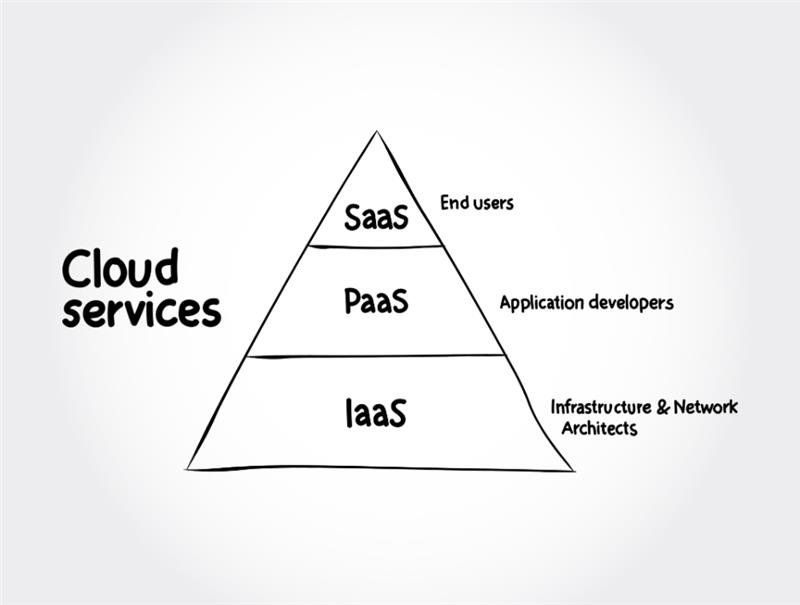
This is a classic strategy mistake companies do. You are paying for potential performance and not actual performance. It often boils down to Platform as a Service (PaaS), where the provider handles the infrastructure, or Infrastructure as a Service (IaaS), where you manage your own servers.
You are introducing a new product. Your team wants absolute control, so they build a complex infrastructure on raw servers (IaaS) right from day one. This implies that you are paying servers to operate 24/7, even when no one visits your site at 3 AM. You are spending more on infrastructure availability rather than utilization.
Engineers enjoy building. Anybody would take pride in developing a strong system that is as good as a Fortune 500 company. They tend to over-engineer for a very large size that has not yet occurred, because they do not want to rewrite code in the future.
Cloud providers love it when you use their proprietary tools because it makes it incredibly hard for you to leave their system.
Let’s say, a team develops its application with proprietary features that are available only on a single cloud provider (such as an AWS database tool or a Queue system available only on Google). One day, your startup is approached by a competitor, maybe Microsoft Azure, which offers to provide 100,000 credits free of charge. The thing is now you cannot take that money. Moving would require rewriting your application since it is hard-coded to the original provider.
Proprietary tools are tempting because they are usually easier to install initially. Developers usually have deadlines; they have to ship features, they choose this shortcut . They often do not think about the business side of things like future discounts or negotiating power.
Read More: If you did this mistake, and you’re looking to reduce AWS bill. This article will give the right steps in right directions.
Zombie resources are active and billing, but not performing any functional role.
A developer brings up a Proof of Concept environment to test a new feature. They work on it for a week. The project is then put on hold. The developer switches to another task. The PoC's load balancers, servers, and databases continue to run. Forever.
The absence of ownership. After the project is completed or the team is finished, no one is clearly assigned the job of cleaning up. It slips through the cracks of the backlog, and as the bill is paid centrally, the individual developer does not suffer the waste.
The most expensive method of cloud operation is to use On-Demand pricing on everything.
Operating steady-state workloads at On-Demand pricing. It is equivalent to spending a year in a hotel and paying the nightly rate each day, rather than signing a lease.
Inertia or fear of commitment; purchasing a Reserved Instance requires a 1-year or 3-year contract. The reason teams tend to procrastinate on this decision is that they believe, "We can change the architecture next month," but never actually do, and the high costs persist.
Zero technical changes will save you 30% to 70% at once.
You cannot maximize what you cannot attribute.
The CFO receives a bill amounting to 100,000. It says $40,000 for EC2. She inquires, Which team spent this? Was it the new marketing campaign or the latest engineering beta? No one knows, since ID numbers simply identify the resources.
The Organization is put second to speed. Metadata tagging is like an unnecessary administrative burden in the rush to introduce new features. It is the first step that is not followed strictly during deployment.
Often referred to as re-hosting, this involves moving applications without adapting them to the new environment.
You take a legacy application running in your on-premises data centre and simply copy it to the cloud without altering its functionality. You are actually paying the cloud to be flexible and utilizing it as a fixed server rack.
Executives often set aggressive deadlines to close data centers, forcing engineering teams to move applications as-is to meet the schedule, intending to optimize later, but later rarely comes.
Read More: If you are struggling with these challenges, you need better cloud cost optimization tools. Consider this bundle. You’ll surely find the right one for your organization.
The obvious costs are compute and storage costs; the silent budget killers are network costs.
The unnecessary transfer of large volumes of data between clouds or to the internet. The entry of data (Ingress) in the cloud is often free, whereas the exit (Egress) is very costly.
Invisibility. These are expenses that are not visible in the design stage. Developers are concerned with connectivity - making sure that services can communicate with one another - and never expect that a regional boundary will result in a per-gigabyte toll fee.
They believe that since it is all in the cloud, the traffic is free.
Data accumulation is an unspoken cost that increases linearly with time.
Keeping terabytes of log files, backups, and media assets that were created three years ago on the most expensive storage tier (such as S3 Standard), yet no one has accessed them in years. Poor vendor selection is a hidden cloud cost trap using vetted directories like TopDevelopers helps teams avoid over-engineered solutions and long-term cloud spend creep caused by the wrong technology partners.
The Digital Packrat mentality. It is safer to keep everything under permanent lock and key than to lose something of great value. Storage is cheap per gigabyte, so the cumulative cost isn't usually noticed until it reaches critical mass.
Cloud cost management cannot be scaled using native tools. The data changes too rapidly. You need to have the appropriate tooling stack to help you.
Native Cloud Tools: Each major provider has built-in tools. AWS possesses Cost Explorer and Trusted Advisor. Azure has Cost Management. Google has Cloud Billing. These are excellent points of departure. They can inform you about what you have spent and offer simple rightsizing suggestions.
Third-Party Platforms: With increasing complexity, native tools might not provide sufficient granularity. The gap can be addressed by third-party platforms or specialized AI-based tools (such as Costimizer). These tools often provide:
The move to the cloud has transformed how businesses operate, yet it has also changed how companies spend money. The cloud is dynamic, so financial management should be dynamic as well.
You must move from a model of Gatekeeping, where procurement tries to block spending, to a model of Guardrails, where engineers have the freedom to build but are guided by automated policies and clear visibility.
The potential of savings is actual. Organizations can cut their cloud bills by 20 to 40% without performance loss by addressing overprovisioning, managing idle resources, and committing to a culture of accountability.
The money is available, right in your monthly bill. It is time to reclaim it.
Ready to take control? Begin by auditing your environment this week. Seek the low-hanging fruit: the zombie servers and the overprovisioned databases. If the data is overwhelming, you can use Costimizer (automated cost optimization platforms) to identify these opportunities.
Focus on the ROI of waste elimination. A $500 tool can pay for itself in six months by reclaiming $10% of a cloud bill. Frame this effort as Cost Control, not Cost Cutting.
No, it's the opposite. Automating cost-saving tasks like turning off Dev/Test environments frees up engineer time. The goal is to shift their focus to uptime at optimal cost.
It makes it harder. You will need a robust tool (like Costimizer) to consolidate billing and apply uniform tagging. Fragmentation reduces the primary benefit of cloud computing visibility.
Start with Rightsizing and eliminating Zombie Resources. Use Costimizer to find non-production servers running 24/7 and resources with and save upto save 10%.
Not until you perform a detailed usage analysis. Only commit to the stable baseline of the 24/7 infrastructure that you are certain won't be re-architected this year.
You can reduce cloud expenses while maintaining high efficiency by using a tool like Costimizer, which offers startup-friendly discounts, real-time spend alerts, right-sizing recommendations, and automated optimization to keep your applications fast without overprovisioning.
Costimizer does this by continuously monitoring your LLM usage, learning your standard spend patterns, and triggering instant alerts when a model update increases token consumption, GPU time, or API calls and exceeds expected thresholds, so you can roll back, fix, or right-size before the bill grows.
•
CTO•
Articles