


Azure Reserved Instances lock you into a specific VM size and region for 1 to 3 years, saving up to 72%. Azure Savings Plans commit a fixed dollar-per-hour spend, saving up to 65% but applying automatically across services and regions. The right choice depends on workload stability. Here is the full breakdown.
Your team likely turned on new servers to grow the company, but now those servers are draining your cash flow.
You know you need to lock in discounts. But should you choose an Azure Reserved Instance or an Azure Savings Plan?
Pick the wrong one, and you could trap thousands of dollars in unused cloud capacity. Pick the right one, and you could cut your bill by over half.
Let us look at exactly how to decide, so you can stop bleeding money today.
Key Takeaways:
If your business runs servers 24 hours a day, paying standard retail prices is a massive waste of money. An Azure Reserved Instance (RI) is a strict billing contract that fixes this problem.
You agree to rent a specific server model in a single physical data center for 1 or 3 years. In exchange for this predictability, Microsoft drastically cuts your bill.
When you buy a Reserved Instance, you lock in your hardware choices. You must tell Azure exactly which Virtual Machine (VM) size you want and which data center region it will run in.
For example, if you buy a reservation for a "D-series" server in the "East US" region, your discount only applies to that exact setup.
Key Features: Priority vs. Flexibility
When you set up your reservation, you must choose how it behaves.
Technology changes fast. If your engineering team constantly updates software or moves between regions, a strict reservation becomes a financial liability. An Azure Savings Plan is a modern billing agreement built for change.
Instead of committing to a specific server type, you commit to spending a fixed dollar amount per hour (for example, $50 per hour) for one or three years.
Microsoft automatically applies a discount to any eligible service you use, anywhere in the world, until your usage hits that $50 limit for the hour. If a traffic spike causes you to spend $60 in one hour, the extra $10 is simply billed at the standard, standard rate.
Eligible Services
Unlike reservations, the Savings Plan floats automatically across modern cloud services.
It covers:
You must weigh the financial risks against the savings. Here is the comparison table to help you make better purchasing decisions.
Financial Decision Factor | Azure Reserved Instances (RIs) | Azure Savings Plans |
Maximum Potential Discount | Up to 72% (Highest savings available) | Up to 65% (Traded for flexibility) |
What You Actually Commit To | A specific server size in a specific region | A fixed dollar amount spent every hour |
Flexibility to Change Tech | Low. Tied to specific hardware families. | High. Floats automatically across services. |
Geographic Flexibility | None. Locked to the data center you chose. | High. Applies globally to any Azure region. |
Early Cancellation Policy | Allowed, but incurs a 12% fee. | Strictly prohibited. No cancellations. |
Maximum Refund Limit | Hard cap of $50,000 USD per rolling year. | $0 |
Ideal Business Scenario | Legacy databases and stable, 24/7 applications. | Modernizing applications and scaling websites. |
Not sure which to pick? Use this three-row shortcut:
Your Situation | Best Choice | Why |
Stable workload, same VM size for 1 to 3 years | Reserved Instance | Maximum 72% discount, highest ROI |
Changing workload, regions, or services often | Savings Plan | Discount follows usage globally, no lock-in risk |
Mixed: stable core plus variable burst usage | Blend both | RI covers a stable baseline, SP covers a variable layer, and PAYG for spikes |
Purchasing these discounts changes how your monthly invoice is calculated. You need to understand the underlying mechanics to prevent budget shortfalls. Before committing to long-term discounts, it’s important to understand the fundamentals through a complete Azure cost management guide to avoid costly mistakes.
Many CXOs look at the 72% discount and assume their entire bill will drop by that exact amount.
This is completely false. Both Reserved Instances and Savings Plans only discount the underlying computer hardware (the infrastructure). They do not cover the operating system license.
If you run Windows Server or SQL Server, you still pay full price for the software license. To reduce the software cost, you must use the Azure Hybrid Benefit.
This program allows you to apply software licenses you already own to your cloud servers. Using the Azure Hybrid Benefit alongside a Reserved Instance is the only way to reach the 80% total savings mark.
Many companies use both RIs and Savings Plans simultaneously. When your monthly bill is generated, Azure follows a strict priority rule.
Azure applies the Reserved Instance discount first. It finds the specific servers matching your RI contracts and discounts them. After all RIs are applied, Azure looks at your remaining usage. It then applies the Savings Plan discount to the remaining eligible resources.
This ensures you always receive the highest possible discount on your bill.
Both discount models operate on a "use it or lose it" basis. They are evaluated hourly. If you commit to a $10 per hour Savings Plan, and you only use $6 worth of computing power between 2:00 PM and 3:00 PM, you lose the remaining $4.
The unused credit does not roll over to the next hour. You pay the full $10 regardless of your actual usage.
Some technical leaders worry that discounted servers run slower than full-price servers. This is a myth. These models are purely financial billing adjustments. They do not alter the physical hardware, network speed, or availability of your servers.
Here is the exact same thing answered on the official site when a user asked if there is "any performance degradation or changes when applying the Azure Savings plan"
image.png
To maximise your returns without overcommitting, you should follow a specific purchasing sequence. Financial experts refer to this as the Waterfall strategy.
image.png
If you want to understand how to reduce azure vm costs, never buy a discount for an oversized server.. If your team is running a server with 16 cores, but the application only requires 4 cores, reduce the server size first. Buying a Reserved Instance for the 16-core machine locks in waste. You get a discount on resources you do not need.
If you already own Reserved Instances that are sitting unused, exchange them. Azure allows you to trade an unused RI for a new RI of equal or greater value. Reassign your existing commitments to hardware you are actually using today.
Important (2024 Policy Change): As of July 2024, RIs purchased after that date can no longer be exchanged for other RIs. You can still trade them into a Savings Plan. Only RIs purchased before July 2024 retain one exchange right. Verify your purchase date before assuming you have exchange flexibility.
If you have RIs for workloads that fluctuate wildly, you can trade those strict RIs for a flexible Savings Plan. This converts your rigid hardware commitment into a global monetary commitment, preventing future waste.
Identify your absolute baseline operations. These are the core databases and servers that run 24/7 and will never change regions. Purchase 3-year Reserved Instances for this baseline layer to secure the maximum 72% discount.
Above your stable baseline, you have variable usage. You might spin up extra servers during business hours or run temporary testing environments. Calculate the lowest point of this variable usage. Purchase a Savings Plan to cover this layer.
Leave your highest, most unpredictable usage peaks on standard Pay-As-You-Go pricing. It is cheaper to pay full price for a few hours than to commit to a 3-year contract for capacity you rarely use.
Marketing makes cost savings look easy. Real-world execution is harder. Our FinOps professionals use these strategies.
A common mistake is buying all your Reserved Instances on January 1st. Three years later, all your contracts expire on the exact same day, creating a sudden massive spike in your bill.
Instead, we recommend using staggered buying. You divide your total commitment and purchase smaller blocks every quarter. This creates a rotating portfolio. As business needs change, you have contracts expiring regularly, allowing you to adjust your purchasing strategy without paying early cancellation fees.
Furthermore, our FinOps expert also advises buying 1-year terms for older generation hardware that might become obsolete, and 3-year terms only for the newest generation hardware.
When returning an RI, Azure calculates the refund value. Sometimes, a highly utilised RI that is close to expiring has accrued huge value. Our experts are using these high-value, expiring RIs as "credit providers" to offset the costs and limitations when exchanging underutilised, newly purchased RIs.
The most frequent horror story involves architectural changes. A company commits to three years of Virtual Machine RIs. Six months later, the CTO decided to modernise the application using PaaS (Platform as a Service) features, such as Azure App Services.
The company moves the application, turns off the Virtual Machines, and is left holding thousands of dollars in RI contracts they can no longer use. This exact scenario is why the Flexible Savings Plan was created.
Microsoft changed RI exchange rules in January 2024. RIs purchased after July 1, 2024 can no longer be exchanged for other RIs. You can trade them into a Savings Plan, but the RI-to-RI swap is gone. Teams that built their optimization strategy around exchanging RIs regularly must now account for this. If your RI portfolio was mostly purchased after mid-2024, your flexibility is lower than you may assume. Plan your buying schedule accordingly and use Savings Plans for workloads where you expect architecture changes.
To clarify the decision process, let us look at specific business situations.
A manufacturing firm runs 10 virtual machines in the US East region to manage its inventory software. The software is five years old. The company has no plans to rewrite the code or move the servers.
The Decision: The company should purchase 3-year Reserved Instances. The workload is completely stable. They need the maximum discount. Flexibility offers them no value.
A retail business is actively rewriting its customer portal. They currently use virtual machines, but they plan to migrate to Azure Kubernetes Service (AKS) over the next 18 months. They also plan to expand into the European market.
The Decision: The business must use the Azure Savings Plan. If they buy RIs, those contracts become useless the moment they move from VMs to Kubernetes. The Savings Plan discount will automatically follow their usage from the VMs to the containers, and from the US region to the European region.
A financial institution has a massive database that never changes, alongside a customer-facing application that scales up during tax season.
The Decision: They should blend the models. They buy RIs to cover the database. They calculate the minimum daily compute required for the customer application and buy a Savings Plan for that amount. They let the tax-season spikes run on PAYG pricing.
A SaaS company runs its core application on Azure but uses AWS for data processing and machine learning pipelines. Both clouds carry significant compute bills. The team needs a unified commitment strategy across both providers.
The Decision: Azure Savings Plans and AWS Savings Plans share structural similarities but differ in important ways. Azure Savings Plans are generally more flexible across service types than their AWS equivalents. AWS offers more RI types (Convertible, Standard, Scheduled) while Azure’s Savings Plan flexibility covers a broader range of compute services automatically.
For this team, the right approach is to use Azure Savings Plans for workloads that shift between services, Azure RIs for stable databases, and AWS Convertible RIs for data pipelines that rarely change hardware families.
A third-party platform that manages both clouds under one roof eliminates manual tracking overhead across two billing systems. For teams also managing Kubernetes cost optimization alongside cloud commitment purchases, unified visibility across both layers is a significant advantage.
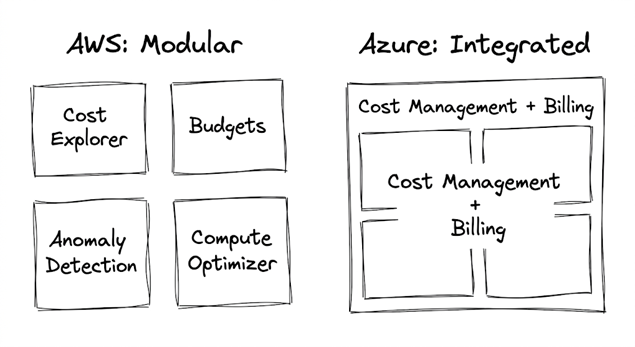
Both Azure and AWS offer Reserved Instances and Savings Plans, and the underlying logic is structurally similar: commit to usage or spend in exchange for a discount. But the two implementations differ in important ways that affect your purchasing strategy.
RI types: AWS offers more RI types than Azure. AWS has Standard RIs (fixed, highest discount), Convertible RIs (exchangeable, slightly lower discount), and Scheduled RIs (reserved capacity windows). Azure RIs are closer to AWS Standard RIs: locked to a specific VM size and region, with one exchange right for RIs purchased before July 2024.
Savings Plans flexibility: Azure Savings Plans are generally more flexible across service types than their AWS equivalents. Azure’s Compute Savings Plan automatically applies to VMs, AKS, App Service, Container Instances, and Functions without manual scope management. AWS Savings Plans also cover compute broadly, but the scoping and coverage rules differ between EC2 Instance Savings Plans and Compute Savings Plans, requiring more careful configuration.
Learn More: Azure vs AWS Cost Explorer
Microsoft provides free native tools like Azure Advisor and Azure Cost Management. These tools are helpful for small businesses, but they fail at the enterprise level.
Native tools are backward-looking. Azure Advisor recommends purchases based on your last 30 days of usage. If you ran a massive, one-time data processing job last month, Azure Advisor will incorrectly recommend that you buy a 3-year commitment for that temporary spike.
Also Read: Azure Cost Anomaly Detection
Relying on these tools requires constant manual review. Engineering teams often complain about the babysitting required to constantly check dashboards, match tags, and calculate exact break-even points before making a purchase.
At a certain scale, manual calculations cost more in labour than they save in cloud discounts. This is why companies adopt third-party FinOps platforms like Costimizer.
Instead of just showing you a chart of past spending, it actively models your future needs. It connects directly to your cloud environment, identifies oversized resources, safely scales them down, and then automatically calculates the exact mix of RIs and Savings Plans required for the optimised baseline.
With tools like Costimizer, you eliminate the risk of human error in your purchasing strategy. You set the financial guardrails, and the system executes the optimisation securely.
Native tools like Azure Advisor surface recommendations but leave the purchasing decision and execution to your team. Third-party FinOps platforms like Costimizer go further: they automatically evaluate your actual usage patterns, model the cost impact of different commitment mixes, and then purchase the right combination of RIs and Savings Plans on your behalf. The system monitors your environment daily and handles exchanges or trade-ins when workloads change, without requiring manual intervention from your engineering team. Compared to Azure Advisor, Costimizer is forward-looking rather than backward-looking. Azure Advisor analyses the last 30 days of usage and produces a static list of suggestions. Costimizer continuously models projected usage, factors in workload seasonality, and executes purchases only when a net reduction in monthly cost is mathematically confirmed. For teams spending significant amounts on Azure compute, the engineering hours saved on manual review typically exceed the platform cost within the first quarter.
Both Azure Reserved Instances and Azure Savings Plans offer massive reductions in your monthly infrastructure bill. RIs deliver the highest total discount but demand rigid adherence to specific hardware. Savings Plans offer slightly lower discounts but provide the global flexibility required for modern, shifting architectures.
The most successful companies do not choose just one. They clean their environments, lock down their stable databases with RIs, cover their variable compute with Savings Plans, and automate the entire lifecycle.
If you want to take control of your cloud budget. Try Costimizer to discover your exact break-even points before you sign a three-year contract.
You do not have to rebuild or restart anything. These plans are strictly billing updates applied to your current account. Your servers stay exactly where they are with zero downtime.
Yes. Costimizer consolidates your disconnected subscriptions into a single, clear system. It automatically applies the correct discount to the correct department, eliminating the confusion of manual spreadsheet tracking.
You cannot cancel a Savings Plan if you leave Azure; you must pay the hourly rate until the contract ends. Reserved Instances allow cancellations, but Microsoft caps refunds at $50,000 per year and charges a 12% fee.
Costimizer tracks your contracts every single day. If your server needs change, the system automatically handles the exchange process, trading your strict reservations for flexible Savings Plans so your money is never wasted.
Microsoft lets you pay monthly for both plans at the same total price as paying upfront. Choosing the monthly payment option protects your cash flow without reducing your final discount.
Costimizer does the complex math before spending your money. It continuously monitors your active usage and only executes a purchase when it can mathematically guarantee a net reduction in your monthly bill.
No, this is usually a mistake. Development servers are often turned off at night or on weekends to reduce bills. If you buy a continuous 24/7 commitment for a server that is turned off, you are paying for nothing.
Azure Advisor only gives you a list of suggestions based on old data, leaving the manual purchasing work to you. Costimizer actively cleans up your wasted servers first, then automatically buys and manages the exact right discounts on your behalf.
Costimizer automatically evaluates your Azure usage patterns, models the optimal commitment mix, and purchases the right combination of Reserved Instances and Savings Plans on your behalf. Unlike Azure Advisor, which produces a static list of suggestions requiring manual action, Costimizer executes purchases automatically and monitors your portfolio daily. When workloads change, it handles exchanges or trade-ins without requiring your engineering team to intervene.
The clearest signal is your utilisation rate: a Reserved Instance or Savings Plan delivering real savings should show 90% or higher utilisation consistently. If utilisation drops below that threshold, you are paying for commitment you are not using. Costimizer’s utilisation dashboard tracks this in real time, flags underperforming commitments, and automatically recommends whether to exchange, trade in, or let the contract expire. You can see the exact dollar value recovered versus the committed spend on any given day.
Reserved Instance availability in Azure Government Cloud (GCC High) differs from commercial Azure. Many RI-eligible VM families are available in GCC High, but the portfolio is smaller than in commercial regions. Azure Savings Plans are generally not available in sovereign clouds, including GCC High and Azure Government. If you are in a government cloud environment, your primary commitment option is Reserved Instances for eligible VM families. Verify availability for your specific VM series directly with Microsoft’s government cloud pricing documentation, as the eligible list changes periodically.
•
DevOps Engineer•
Articles

















