



Why does Azure Cosmos DB look affordable at first, but somehow keep getting more expensive every month? For many teams, the answer is buried inside request units, storage charges, bandwidth costs, and expensive setup choices that are easy to miss.
This blog will help you understand exactly how Cosmos DB pricing works, what drives your bill, and which practical changes can reduce waste quickly.
Key Takeaways:
Microsoft calculates your database costs using three separate categories. Understanding these categories is the first step to controlling your expenses.
You pay for the processing power required to run your database. Microsoft measures this power in two ways, depending on the setup you choose.
The primary measurement is the Request Unit (RU). Every time your application reads data, writes data, or searches the database, it consumes RUs. You pay for the rate of RUs you provision per second (RU/s).
If you use specific setups, you might pay for virtual cores (vCores) instead.
For example, Azure Cosmos DB for MongoDB vCore pricing charges you for dedicated server capacity rather than individual request rates. Similarly, Azure Cosmos DB for PostgreSQL pricing relies on a compute node structure.
You pay to store your actual data. Microsoft bills this per gigabyte (GB) every month.
This storage falls into two types.
Transactional storage holds the live data your application uses every second. This includes your customer profiles and active shopping carts. You also pay to store the indexes. Indexes act like the table of contents in a book. They help the database find information quickly, but they consume gigabytes of paid space.
Analytical storage is different. If you use the Azure Synapse Link feature, the system saves a separate copy of your data for deep business analysis. Microsoft charges a different, often lower, rate for this analytical storage.
Moving data into the Azure cloud is generally free. Microsoft wants your data on its servers.
Moving data out of the Azure cloud costs money. This is called data egress. If your database sits in a Virginia data center, and a customer in London downloads a large file from it, you pay a bandwidth fee for that geographical transfer. Moving data between different Azure regions also generates bandwidth charges.
CXOs often struggle to visualize a Request Unit. An RU is simply a currency. It combines the processor speed, memory, and disk reading power needed to complete one database task.
Think of how you stream a YouTube video. If you select 144p quality, the video loads instantly. It requires very little internet data. If you select a 4K high-definition quality, the video demands massive amounts of data. It forces your internet connection to work much harder.
Request Units operate the same way. Reading a tiny, simple piece of data is like the 144p video. It costs exactly one Request Unit. Asking the database to search through millions of records and sort them by date is the 4K video. It demands heavy processing and might cost hundreds of Request Units.
The billing is strictly mathematical. If your application writes a new customer record to the database, and that action costs 10 RUs, you must account for volume. Performing that exact write operation 100 times per second requires you to buy a capacity of 1,000 RU/s.
Several factors determine how expensive a single database operation will be. Here are a few.
Item Size: Storing a large file costs more than storing a small file. A highly optimized text document weighing 1KB might cost 5 RUs to write. A bloated data file weighing 100KB will cost significantly more RUs to process. Heavy files drain your budget quickly.
Query Complexity and Indexing: Searching for data takes effort. By default, Cosmos DB indexes every single piece of data you save. This makes searching incredibly fast. However, maintaining that massive index consumes a large amount of RUs every time you update a record. Complex searches that filter through multiple categories will also burn through your RU budget.
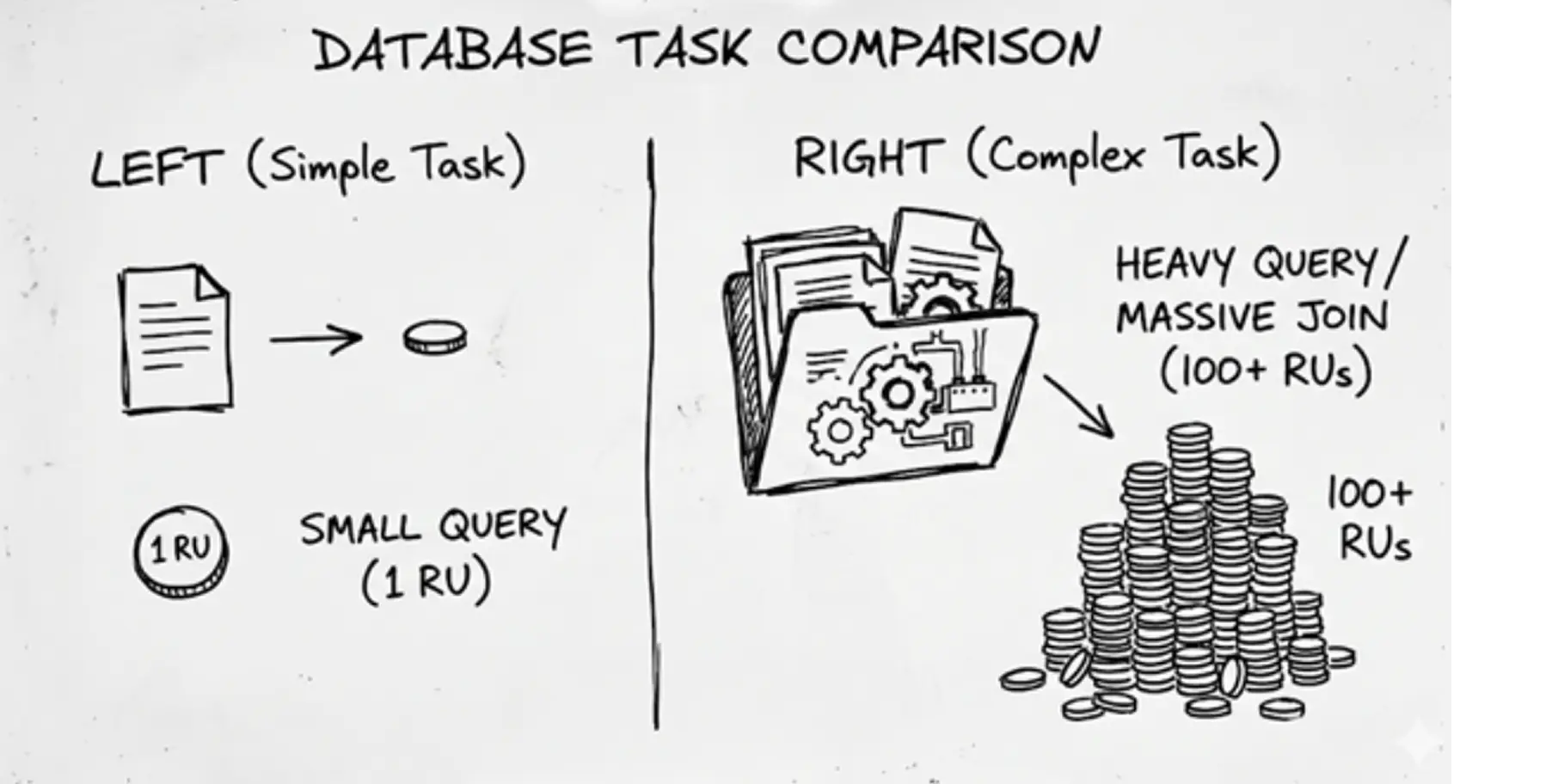
Consistency Levels: Database consistency dictates how perfectly synchronized your data is across the globe. "Strong consistency" ensures every user worldwide sees the exact same data at the exact same millisecond. Providing this perfect synchronization requires double the RUs compared to looser consistency settings.
You must decide how you want to purchase these Request Units. Microsoft offers three different billing models. Selecting the wrong model guarantees you will overpay.
This is the manual model. You tell Microsoft exactly how many RUs you want available every second. You pay a fixed hourly rate for this capacity, 24 hours a day.
If you reserve 1,000 RU/s, you pay for 1,000 RU/s. It does not matter if your application only uses 100 RU/s during the night shift. You still pay the full rate. This model works best for applications with highly predictable, constant traffic.
Autoscale removes the manual guessing. You set a maximum limit. The system automatically adjusts your capacity between 10% and 100% of that maximum limit based on live traffic.
If you set a maximum of 4,000 RU/s, the system will scale down to 400 RU/s when traffic is low. This sounds perfect, but there is a catch. The hourly rate for Autoscale RUs is 50% more expensive than the Standard manual rate.
You pay a premium for the automation. Use this model only when your traffic spikes unpredictably.
Serverless operates purely on a pay-as-you-go basis. You do not reserve any capacity upfront. You only pay for the exact number of RUs your application actually consumes.
If your database sits entirely idle for three hours, you pay zero compute costs for those three hours. This model fits perfectly for small side projects, development testing, or applications that receive traffic only a few times a day.
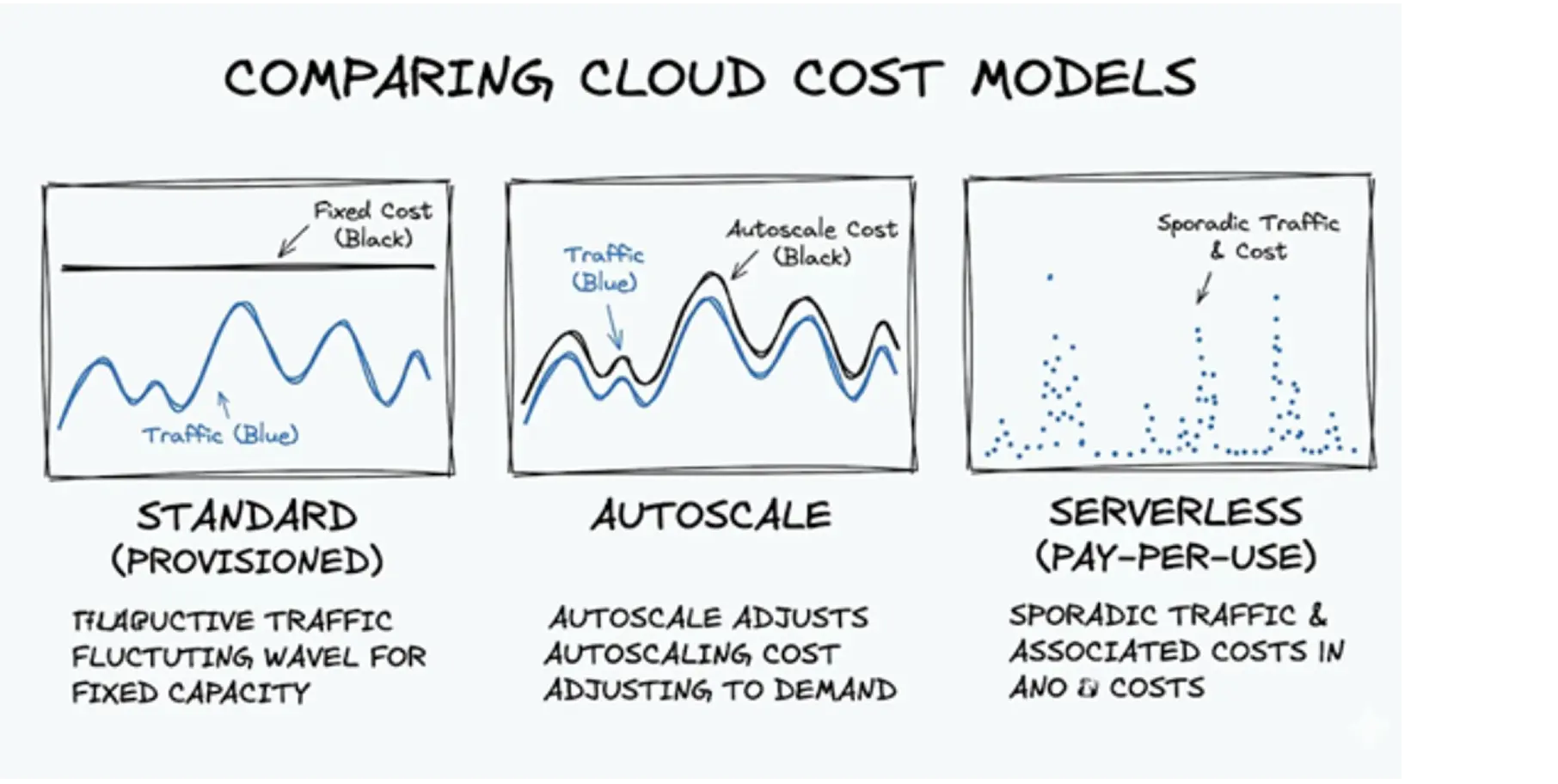
Use this simple framework to make your choice:
The official documentation on Azure Docs explains the rules. Real-world usage exposes painful issues. Many engineering teams discover these hidden fees only after they use them.
Serverless billing promises that you only pay for what you use. This is mostly true for compute power. It is not true for storage.
A well-known engineering complaint highlights this issue. A developer built a small test application using serverless. The total data stored was less than 900 kilobytes. When the bill arrived, Microsoft charged them for gigabytes of storage.
One Reddit user shared their exact frustration: "The total storage used by all containers is less than 900kB... Why is the total cost for the Data Stored is $1.94".
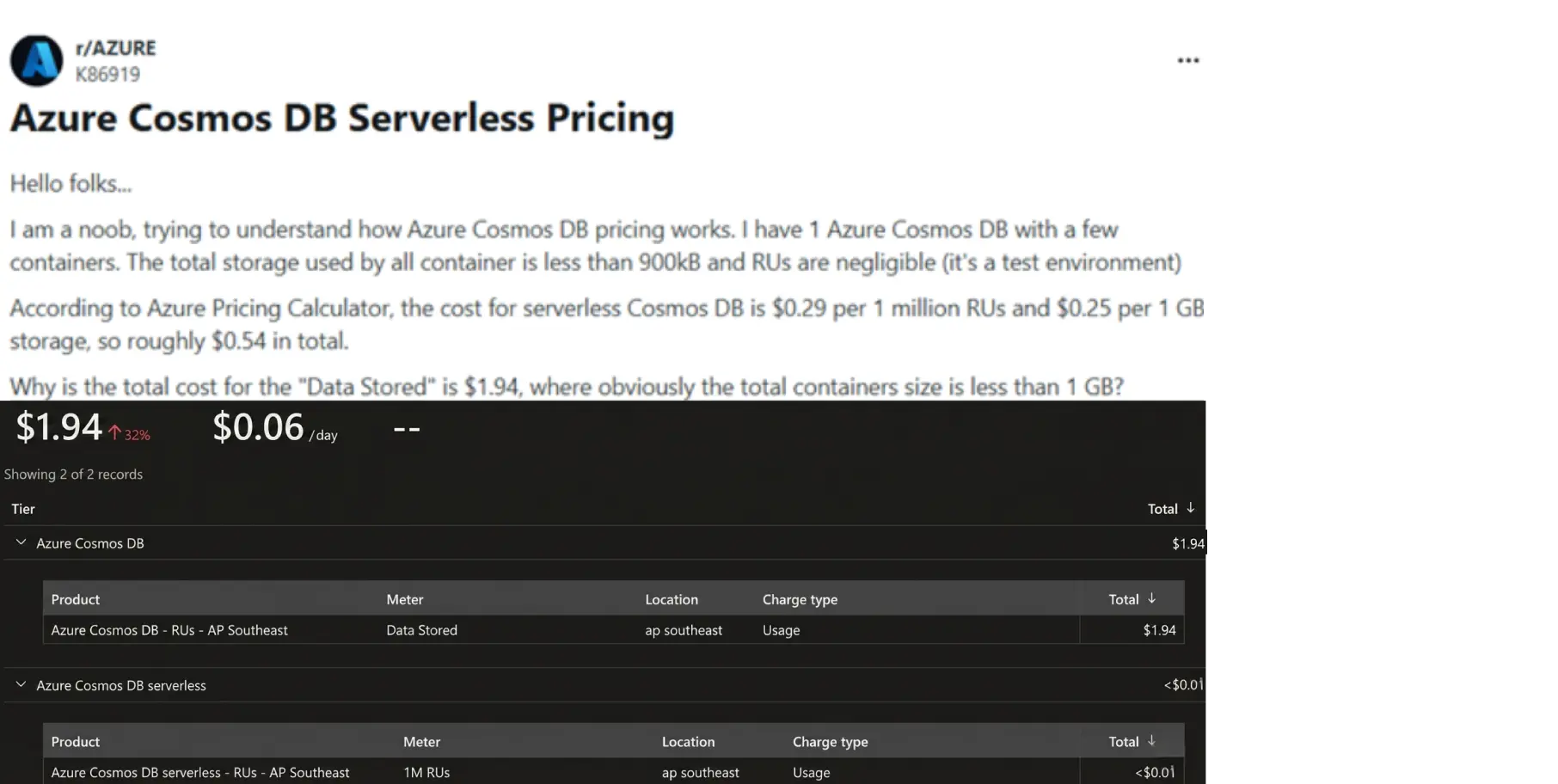
The answer lies in the fine print. Certain serverless setups enforce minimum billable storage amounts, often charging for 5 GB even if you store a fraction of a megabyte. This minimum threshold catches many small businesses off guard.
Global companies want fast applications. To achieve this, they turn on a feature called multi-region writes. This feature copies the database to multiple physical locations worldwide. Users in Tokyo read from a Tokyo server. Users in New York read from a New York server.
This performance comes with a severe financial penalty. Activating multi-region writes makes every copied region writable as a primary database. This essentially doubles the Request Unit cost for your write operations.
If a company does not strictly need real-time global editing, this feature acts as a massive financial drain.
Data safety is critical. Microsoft automatically backs up your database. However, retaining those backups costs money.
Many teams mistakenly configure hourly backups and keep them for extended periods, such as seven days. Every snapshot consumes storage space. Retaining dozens of backups rapidly inflates your monthly storage bill.
CXOs frequently ask: "Will moving to AWS save us money?" A deeper comparison of azure vs aws pricing models often reveals how architectural choices impact long-term costs. If your application relies on multiple data models, migrating could actually multiply your cloud bill.
Because Azure Cosmos DB is natively multi-model, it supports both standard document data and complex graph data on a single, unified platform. AWS forces a fragmented approach: you must provision DynamoDB for your documents and purchase NeptuneDB separately for your graphs.
Database expert and author Thomas LaRock evaluated a heavy enterprise workload requiring 50,000 Request Units per second (RU/s). Here is how the exact same data requirements price out across both clouds:
Workload Requirement | Azure Cosmos DB | AWS Equivalent |
Architecture | Single Platform (Native Multi-model) | Fragmented (DynamoDB + NeptuneDB) |
Throughput Baseline | 50,000 RU/s | Equivalent Read/Write Capacity Split |
Estimated Monthly Cost | ~$3,000 | $22,000 |
Expert Insight: Provisioning an equivalent high-throughput, multi-model setup in AWS can cost up to 7x more than Azure. The AWS setup inflates rapidly because you are forced to pay for overlapping read/write capacities in DynamoDB while simultaneously absorbing expensive hourly server instance fees for NeptuneDB.
The Business Takeaway:
Cosmos DB's baseline pricing often causes initial sticker shock. However, its true financial value lies in architectural consolidation.
By using a single platform, you eliminate redundant compute costs, bypass secondary database licensing, and drastically reduce the engineering overhead required to keep fragmented data silos in sync.
You must predict your expenses before you build and implement azure cost anomaly detection to track unexpected spending after you launch. Relying on assumptions leads to budget failures.
Do not assume your required capacity. Use the official Azure Cosmos DB Capacity Calculator.
You input your expected file sizes. You input your expected number of reads and writes per second. The calculator outputs a highly accurate estimate of the RUs you need to purchase. You can also adjust the tool to see the specific Azure Cosmos DB pricing for different APIs. This includes checking the Azure Cosmos DB for MongoDB pricing or standard NoSQL options.
Once your application is live, you must monitor it. You can track this directly in the Azure Portal.
Navigate to the Metrics section of your Cosmos DB account. You can view a chart displaying your exact consumed throughput. You can even isolate specific database searches to see exactly how many RUs a single action costs.
If one specific search consumes 500 RUs, your engineers must rewrite it. This visibility gives you direct control over your invoice.
Implement these seven strategies to stop funding cloud waste, or use advanced azure cost optimization tools to automate these actions at scale.
Never pay for development environments. Microsoft offers a lifetime free tier for Azure Cosmos DB. This provides 1,000 RU/s and 25 GB of storage at absolutely no cost. Mandate that your engineering team uses this free tier for all testing and staging environments.
Database storage is not a filing cabinet for large media. Keep your database items small. If your application handles user profiles, store the text details in Cosmos DB. Offload the heavy profile pictures to standard Azure Blob Storage by following an azure blob storage pricing guide. Blob storage costs pennies. Keeping large images out of your database drastically reduces your RU consumption.
If your business has predictable, steady traffic, stop paying the hourly retail rate. Microsoft allows you to commit to a 1-year or 3-year contract for your database capacity. This is called Reserved Capacity.
Committing upfront offers discounts of 20% to 65% off the standard price. This is the fastest way to slash a stable bill. Understanding azure reserved instances vs saving plans helps you choose the right commitment model for your workload
By default, Cosmos DB indexes every single property in your database. This makes setup easy, but running the database is expensive. Instruct your engineers to apply custom indexing policies.
They must identify which specific data points users actually search for.
They must turn off indexing for everything else.
This reduces storage costs and lowers the RU cost of every write operation.
Microsoft provides two free periodic backup copies by default. Sticking to this default saves money. Unless your specific industry compliance laws strictly dictate otherwise, do not configure hourly backups with week-long retention periods.
Engineers frequently build temporary databases for specific projects. They finish the project and forget to delete the database. You continue paying the minimum RU fees for these abandoned containers every month. Schedule a monthly audit. Check the utilization metrics. If a container shows zero activity for 30 days, delete it.
Do not replicate your database across the globe simply because the feature exists. Cross-region data transfers trigger bandwidth costs.
Multi-region writes double your compute costs. Only replicate your data to a new region if a massive percentage of your paying customers live in that exact region.
Keep your traffic local unless extremely high-availability requirements justify the extra expense.
You now understand exactly how Microsoft calculates your Azure pricing for Cosmos DB.
You know the difference between compute RUs and storage fees.
You know how the serverless model traps small workloads, and you understand the massive premium attached to multi-region scaling.
You have the seven strategies required to trim the waste.
You are a business owner, and your priority is growth, not auditing cloud invoices manually. Cloud waste happens when technical choices lack financial oversight. Your engineers want to build fast. You want to stay under budget.
This is where Costimizer acts as your guide. You do not need to hunt for idle databases yourself. Costimizer is an automated platform that connects to your Azure environment in seconds. It scans your entire architecture, identifies the bloated indexes, flags the unused resources, and pinpoints exact areas where Reserved Capacity will save you money.
Do not let cloud waste drain another month of your operational budget.
Stop paying for infrastructure you do not use. Start a free trial of costimizer today, run a fast assessment of your Azure account, and reclaim your cash flow.
Yes. Writing data always costs more Request Units than reading data. When you write a new record, the database must process the file and update the search indexes simultaneously, which requires more compute power.
Once you connect your Azure account, the platform scans your entire architecture and identifies waste in under 15 minutes. You can see exact dollar amounts tied to specific engineering fixes on your very first day.
Azure does not let you set a hard cap that automatically shuts down your database. You can set budget alerts to notify your team when spending gets high, but the database will stay online and continue charging your account.
Yes. Costimizer analyzes your actual daily traffic history and calculates the math for both pricing models. It tells you exactly which databases should use Standard and which should use Autoscale to keep your costs as low as possible.
If you use more than the free 1,000 RU/s or 25 GB of storage, Azure will not pause your application. It simply starts charging standard retail rates for any usage that goes over your free allowance.
Azure Cost Management reports what you already spent last month, making it a reactive tool. Costimizer actively watches your live environment and provides exact engineering instructions to fix expensive indexes and idle containers before you get the next bill.
Data moving between Cosmos DB and another Azure service located in the exact same region is free. You only pay bandwidth fees if your data crosses into a different geographic region or leaves the Azure network entirely.
No. Costimizer only requires read-only access to your cloud billing and performance metrics. The system never reads, moves, or stores your actual customer data or database contents.
•
DevOps Engineer•
Articles

















